<?xml version="1.0" encoding="utf-8"?>
<feed xmlns="http://www.w3.org/2005/Atom" >
  <generator uri="https://jekyllrb.com/" version="4.4.1">Jekyll</generator>
  <link href="https://mouaad.aallam.com/feed.xml" rel="self" type="application/atom+xml" />
  <link href="https://mouaad.aallam.com/" rel="alternate" type="text/html" />
  <updated>2026-06-20T10:56:34+00:00</updated>
  <id>https://mouaad.aallam.com/feed.xml</id>


    <title type="html">Mouaad Aallam</title>


    <subtitle>Mouaad Aallam&apos;s personal website/blog</subtitle>


    <entry>
      

      <title type="html">Writing Libraries Is Writing Contracts</title>
      <link href="https://mouaad.aallam.com/writing-libraries-is-writing-contracts/" rel="alternate" type="text/html" title="Writing Libraries Is Writing Contracts" />
      <published>2026-05-09T10:00:00+00:00</published>
      <updated>2026-05-09T10:00:00+00:00</updated>
      <id>https://mouaad.aallam.com/writing-libraries-is-writing-contracts</id>
      
      
        <content type="html" xml:base="https://mouaad.aallam.com/writing-libraries-is-writing-contracts/"><![CDATA[<p>Writing a library starts with code, but maintaining one is mostly about contracts.</p>

<p>Every public function, type, default value, error message, dependency, and example becomes something users can build on. Once they do, changing it is no longer a private refactor. It is a negotiation with people who are trying to keep their own systems working.</p>

<p>That is the part that took me time to appreciate. A library can be small, elegant, and well-tested, but the moment it has users, its shape matters beyond its implementation. The API becomes a promise. The docs become a promise. The release process becomes a promise. Even the things you choose not to expose become part of how users understand the library.</p>

<p>I have felt this across different kinds of projects: a larger API client such as <a href="https://github.com/aallam/openai-kotlin"><code class="language-plaintext highlighter-rouge">openai-kotlin</code></a>, smaller focused Kotlin libraries, and newer runtime-boundary work like <a href="https://github.com/aallam/execbox"><code class="language-plaintext highlighter-rouge">execbox</code></a>. The details are different, but the maintenance pressure is the same: once people depend on your library, you are not only publishing code. You are publishing expectations.</p>

<div class="text-center">
  <p><img src="https://mouaad.aallam.com/assets/images/blog/library_contract.svg" alt="Library contracts between maintainers and users" width="90%" /></p>
</div>

<h2 id="public-api-is-more-than-types">Public API is more than types</h2>

<p>It is tempting to think of public API as the list of exported symbols. Functions, classes, interfaces, modules, packages. That is only the visible part.</p>

<p>The real API also includes behavior:</p>

<ul>
  <li>what happens when input is missing,</li>
  <li>whether calls are lazy or eager,</li>
  <li>which errors are thrown and when,</li>
  <li>whether ordering is stable,</li>
  <li>how cancellation works,</li>
  <li>how retries, timeouts, and defaults behave,</li>
  <li>which platforms are supported,</li>
  <li>which values are accepted even if the type allows more.</li>
</ul>

<p>Users learn those details from your implementation, docs, examples, and tests. If the behavior is useful, they will depend on it. If the behavior is accidental, they may still depend on it.</p>

<p>This is why library code needs a different level of care than application code. In an application, an internal function can be fixed when its caller changes. In a library, you do not control the callers. They live in other repositories, other companies, other release cycles, and sometimes other time zones. You only see them when an issue appears.</p>

<p>The harder part is that users rarely depend on your API exactly the way you imagined. They will compose it with frameworks you do not use, run it on platforms you do not test every day, and rely on edge cases because those edge cases solve real problems for them.</p>

<p>That does not mean every behavior must be frozen forever. It means public behavior should be intentional. If something is not meant to be stable, do not expose it casually. If something is stable, test it like a contract.</p>

<h2 id="small-surfaces-survive">Small surfaces survive</h2>

<p>The easiest API to maintain is the one you did not publish.</p>

<p>This sounds obvious, but it is one of the most useful lessons in library design. Every public helper, option, overload, type alias, package path, and configuration hook creates future work. It may need documentation. It may need tests. It may need compatibility. It may limit a future internal design.</p>

<p>Small public surfaces are not about minimalism for its own sake. They are about preserving room to improve the library without breaking users.</p>

<p>A good library usually has more internal machinery than public API. That is fine. Internals can be ugly for a while. They can be renamed, split, optimized, generated, deleted, or replaced. Public API has a different cost model. Once it exists, removal is expensive.</p>

<p>This is especially important when a project is young. Early versions are full of uncertainty. You may not know the right abstractions yet. You may not know whether users need a low-level primitive or a higher-level workflow. Publishing too much too early turns guesses into obligations.</p>

<p>The better default is to expose the smallest useful path, then let real usage pull more surface area out of the internals. When a pattern repeats, promote it. When users keep reaching around the API, understand why. When an option exists only because the implementation happened to have it, keep it private.</p>

<p>Small surfaces also make documentation and examples better. A library that can be explained with a few concepts is easier to adopt, easier to debug, and easier to trust.</p>

<h2 id="docs-are-part-of-the-contract">Docs are part of the contract</h2>

<p>Documentation is not a decoration around the library. For many users, it is the library.</p>

<p>The first example teaches them what the maintainers consider normal. The getting-started page defines the happy path. The advanced guide tells them which use cases are expected. The upgrade guide tells them whether changes are predictable. Missing docs tell them where the contract is weak.</p>

<p>This is why examples matter so much. Users copy them. They build habits from them. If the example skips error handling, people will skip error handling. If it uses an unstable internal helper, people will use that helper. If it shows a pattern that only works in a narrow environment, users will assume the library failed when it does not work elsewhere.</p>

<p>Docs also help maintainers make decisions. If a behavior cannot be explained clearly, the API may be wrong. If a feature needs five paragraphs of caveats, it may be too complex, too early, or sitting at the wrong abstraction level. If the docs keep saying what the library does not do, the project may not have a clear enough positive shape yet.</p>

<p>The best docs do not need to cover every implementation detail. They need to make the contract legible:</p>

<ul>
  <li>what the library is for,</li>
  <li>what the main path looks like,</li>
  <li>which guarantees users can rely on,</li>
  <li>where the boundaries are,</li>
  <li>how to upgrade when those boundaries move.</li>
</ul>

<p>In practice, docs and design feed each other. Writing the docs often exposes where the API is too clever, where a type name is vague, or where a feature has no obvious place in the mental model.</p>

<h2 id="compatibility-is-a-budget">Compatibility is a budget</h2>

<p>Compatibility is not binary. It is a budget you spend.</p>

<p>Every breaking change spends user trust. Sometimes that spend is worth it. Bad APIs should not live forever just because they were published once. A confusing abstraction can cost users more over time than a well-explained migration. Pre-1.0 libraries especially need room to correct their shape before stability hardens the wrong design.</p>

<p>But breaking changes should be honest. They should solve a real problem, not clean up maintainer discomfort. They should come with migration notes. They should avoid surprising users with unrelated churn. They should be grouped carefully instead of scattered across releases without a story.</p>

<p>Deprecation is useful when it gives users time to move. It is less useful when it becomes a permanent museum of old ideas. A deprecation should answer three questions:</p>

<ul>
  <li>what should users do instead,</li>
  <li>when does the old path go away,</li>
  <li>why is the change worth making.</li>
</ul>

<p>Semantic versioning helps here, but it is not enough by itself. A version number can tell users that a release may break them. It cannot tell them whether the change is understandable, whether the migration is realistic, or whether the maintainers respect their time.</p>

<p>Compatibility also includes softer promises: supported platforms, runtime versions, generated code shape, dependency ranges, serialization formats, package names, module paths, and error semantics. These are easy to treat as implementation details until users build on them.</p>

<p>The maintainer’s job is not to avoid all change. It is to make change predictable.</p>

<h2 id="dependencies-become-user-dependencies">Dependencies become user dependencies</h2>

<p>Every dependency you add to a library becomes part of someone else’s application.</p>

<p>That does not mean libraries should have no dependencies. Good dependencies can reduce bugs, improve standards compliance, and let maintainers focus on the library’s actual purpose. But dependencies carry costs that are different in a library than in an application.</p>

<p>An application chooses its own runtime, deployment target, bundle size, dependency policy, and upgrade schedule. A library is pulled into environments it does not control. A transitive dependency can affect build time, binary size, cold start, platform support, security reviews, licensing, and version resolution.</p>

<p>The question is not “can this dependency help?” The question is “is this dependency part of the contract I want users to inherit?”</p>

<p>Sometimes the answer is yes. Sometimes the answer is no. Sometimes the right design is to keep an integration optional, put it behind a separate package, or accept a little more local code to avoid forcing a large dependency onto every user.</p>

<p>Dependencies also shape maintenance. If your library wraps a fast-moving API, generated models or protocol clients may be necessary. If your library targets multiple platforms, dependency choices can decide which platforms remain possible. If your library sits close to runtime boundaries, dependency behavior can leak into security, lifecycle, or performance expectations.</p>

<p>The dependency tree is not invisible. Users will feel it.</p>

<h2 id="maintenance-is-product-work">Maintenance is product work</h2>

<p>Maintaining a library is product work under technical constraints.</p>

<p>The product is not a UI. It is the experience of adopting, understanding, upgrading, debugging, and trusting the library. Issues, pull requests, release notes, examples, CI, package metadata, and error messages are all part of that experience.</p>

<p>This is where taste matters, but not in the vague sense. Taste is choosing boring names when clever names would be memorable. It is saying no to an option that would make one user happy but weaken the model for everyone. It is keeping a release small enough that users can understand it. It is accepting that a missing feature is sometimes better than a feature with the wrong contract.</p>

<p>A maintainer has to balance different kinds of pressure:</p>

<ul>
  <li>new users want the simplest possible start,</li>
  <li>advanced users want escape hatches,</li>
  <li>contributors want their use cases accepted,</li>
  <li>existing users want stability,</li>
  <li>the maintainer wants the codebase to remain workable.</li>
</ul>

<p>Those goals conflict. A healthy library does not satisfy all of them equally. It chooses a center of gravity and makes that choice visible.</p>

<p>For me, this is the main difference between writing code and writing libraries. Code can be correct in isolation. A library has to be correct in relation to users. It has to age. It has to carry old decisions until they can be changed responsibly. It has to leave enough space for future maintenance.</p>

<h2 id="the-quiet-goal">The quiet goal</h2>

<p>The quiet goal of a library is predictability.</p>

<p>Users should be able to predict how the API behaves. They should be able to predict whether an upgrade is risky. They should be able to predict where to look when something fails. They should be able to predict whether a feature belongs in the library or outside it.</p>

<p>That predictability does not happen by accident. It comes from treating the public surface as a contract, keeping that contract small, documenting it clearly, changing it deliberately, and remembering that every dependency and release is part of the user’s system too.</p>

<p>Reusable code is the beginning. The real work is making it safe for other people to build on.</p>]]></content>


      <author>
        <name></name>
        
        
      </author>


        <category term="Libraries" />
      
        <category term="Open Source" />
      
        <category term="Software Engineering" />


        <summary type="html"><![CDATA[What maintaining open source libraries teaches about API design, documentation, compatibility, dependencies, releases, and user trust.]]></summary>


        <media:thumbnail xmlns:media="http://search.yahoo.com/mrss/" url="https://mouaad.aallam.com/assets/images/generated/posts/2026-05-09-writing-libraries-is-writing-contracts.png" />
        <media:content medium="image" url="https://mouaad.aallam.com/assets/images/generated/posts/2026-05-09-writing-libraries-is-writing-contracts.png" xmlns:media="http://search.yahoo.com/mrss/" />
      
    </entry>
  
    <entry>
      

      <title type="html">Code execution for MCP</title>
      <link href="https://mouaad.aallam.com/code-execution-for-mcp/" rel="alternate" type="text/html" title="Code execution for MCP" />
      <published>2026-04-12T12:10:00+00:00</published>
      <updated>2026-04-12T12:10:00+00:00</updated>
      <id>https://mouaad.aallam.com/code-execution-for-mcp</id>
      
      
        <content type="html" xml:base="https://mouaad.aallam.com/code-execution-for-mcp/"><![CDATA[<p>There is a useful shift happening in agent systems that use MCP: instead of asking the model to call one tool at a time, let it write small programs that call tools inside a controlled execution environment.</p>

<p>That changes the shape of the system. Tool definitions do not all have to sit in the model context. Intermediate results do not all have to be replayed through the model. Multi-step logic can run closer to the data it is manipulating.</p>

<p>This is the pattern <a href="https://github.com/aallam/execbox"><code class="language-plaintext highlighter-rouge">execbox</code></a> is built around: a reusable Node.js library layer for exposing host-defined tools and wrapped MCP servers to guest JavaScript, while keeping capability and runtime boundaries explicit.</p>

<div class="text-center">
  <p><img src="https://mouaad.aallam.com/assets/images/blog/direct_vs_code_execution.svg" alt="Direct MCP tool calling versus code execution" width="90%" /></p>
</div>

<h2 id="problem">Problem</h2>

<p>Direct MCP tool loops are a good default. The client exposes tools, the model picks one, the host executes it, the result goes back into context, and the model decides what to do next.</p>

<p>That loop is simple, but it scales poorly once the tool catalog or intermediate data gets large:</p>

<ul>
  <li>every exposed tool definition consumes context,</li>
  <li>every intermediate result passes back through the model,</li>
  <li>large payloads are copied and summarized repeatedly,</li>
  <li>multi-step control flow becomes token-heavy.</li>
</ul>

<pre class="mermaid">
flowchart LR
    M["Model"] --&gt; T["Tool catalog in context"]
    T --&gt; C1["Call tool A"]
    C1 --&gt; R1["Return result to model"]
    R1 --&gt; C2["Call tool B"]
    C2 --&gt; R2["Return another result"]
    R2 --&gt; M

    classDef model fill:#efe7ff,stroke:#6a3fd4,color:#20113a
    classDef catalog fill:#fff3d6,stroke:#d1a11f,color:#4f3200
    classDef tool fill:#d8f3ef,stroke:#1b8c7a,color:#0f3c36
    class M model
    class T catalog
    class C1,R1,C2,R2 tool
</pre>

<p>For tools that return large documents, search results, database rows, logs, or API payloads, the loop spends too much of the model budget on mechanical data movement. A compact programming surface lets the model call tool-like APIs, filter intermediate values locally, and return only the final result the host needs to see.</p>

<h2 id="signals">Signals</h2>

<p>Anthropic, Cloudflare, and the MCP client best practices have all described the same architecture pressure.</p>

<p>Anthropic’s post, <a href="https://www.anthropic.com/engineering/code-execution-with-mcp">Code execution with MCP: Building more efficient agents</a>, frames direct MCP usage around two scaling problems: tool definitions consume context, and intermediate results consume more context. Their answer is to let the model write code against tool-like APIs, load definitions on demand, and keep intermediate processing inside the execution environment.</p>

<p>Cloudflare’s post, <a href="https://blog.cloudflare.com/code-mode-mcp/">Code Mode: give agents an entire API in 1,000 tokens</a>, makes the same argument from the API side: a large tool surface can become a smaller typed SDK surface that the model uses from generated code. Cloudflare then followed with <a href="https://blog.cloudflare.com/dynamic-workers/">Sandboxing AI agents, 100x faster</a>, focused on where generated code should run.</p>

<p>The MCP docs call this pattern <a href="https://modelcontextprotocol.io/docs/develop/clients/client-best-practices#programmatic-tool-calling-/-code-mode">Programmatic Tool Calling / Code Mode</a>: the model writes code, the code runs in a sandbox, and the host brokers MCP tool calls so only the final result needs to return to the model.</p>

<p>Together, these posts and docs point in the same direction: direct tool calling is useful but expensive at scale, code execution can compress data movement, and the runtime cannot be an afterthought.</p>

<h2 id="execbox">Execbox</h2>

<p><code class="language-plaintext highlighter-rouge">execbox</code> is the library layer I wanted for that pattern. It is not an agent framework or hosted sandbox product; it is a set of Node.js packages that turn host capabilities into callable guest namespaces, then run guest JavaScript against those namespaces through a chosen executor.</p>

<p>The package map is intentionally small: <code class="language-plaintext highlighter-rouge">@execbox/core</code> owns the execution contract, provider resolution, and MCP adapters; <code class="language-plaintext highlighter-rouge">@execbox/quickjs</code> provides inline and worker-hosted QuickJS execution; and <code class="language-plaintext highlighter-rouge">@execbox/remote</code> provides a transport-backed executor for app-owned runner boundaries.</p>

<p>The core flow stays the same across those packages: host code defines tools or discovers them from MCP, those tools become a deterministic guest namespace, guest code runs against that namespace, tool calls cross a host-controlled boundary, and results come back as JSON-compatible data. The same guest code shape can start with inline QuickJS, move to worker-hosted QuickJS, or run through a remote transport that the application owns.</p>

<pre class="mermaid">
sequenceDiagram
    autonumber
    participant App as Host application
    participant NS as Resolved namespace
    participant Guest as Guest runtime
    participant Boundary as Host boundary
    participant Systems as Systems / APIs / MCP servers

    App-&gt;&gt;NS: Define or discover capabilities
    App-&gt;&gt;Guest: Execute code with namespace
    Guest-&gt;&gt;Boundary: Call tool
    Boundary-&gt;&gt;Systems: Invoke capability
    Systems--&gt;&gt;Boundary: Structured result
    Boundary--&gt;&gt;Guest: Return JSON-safe value
    Guest--&gt;&gt;App: Return execution result
</pre>

<p>MCP can appear on either side of the flow. Upstream MCP servers can be wrapped into guest namespaces, and execbox can also expose code execution itself as an MCP server so a client gets a compact code-running surface instead of a large direct tool catalog.</p>

<h2 id="usage">Usage</h2>

<p>In TypeScript, a typical MCP provider flow starts with an MCP server declared through the MCP SDK, then wraps it as an execbox provider.</p>

<div class="language-ts highlighter-rouge"><div class="highlight"><pre class="highlight"><code><span class="k">import</span> <span class="p">{</span> <span class="nx">McpServer</span> <span class="p">}</span> <span class="k">from</span> <span class="dl">"</span><span class="s2">@modelcontextprotocol/sdk/server/mcp.js</span><span class="dl">"</span><span class="p">;</span>
<span class="k">import</span> <span class="p">{</span> <span class="nx">openMcpToolProvider</span> <span class="p">}</span> <span class="k">from</span> <span class="dl">"</span><span class="s2">@execbox/core/mcp</span><span class="dl">"</span><span class="p">;</span>
<span class="k">import</span> <span class="p">{</span> <span class="nx">QuickJsExecutor</span> <span class="p">}</span> <span class="k">from</span> <span class="dl">"</span><span class="s2">@execbox/quickjs</span><span class="dl">"</span><span class="p">;</span>
<span class="k">import</span> <span class="o">*</span> <span class="kd">as </span><span class="nx">z</span> <span class="k">from</span> <span class="dl">"</span><span class="s2">zod</span><span class="dl">"</span><span class="p">;</span>

<span class="kd">const</span> <span class="nx">upstreamServer</span> <span class="o">=</span> <span class="k">new</span> <span class="nc">McpServer</span><span class="p">({</span>
  <span class="na">name</span><span class="p">:</span> <span class="dl">"</span><span class="s2">upstream</span><span class="dl">"</span><span class="p">,</span>
  <span class="na">version</span><span class="p">:</span> <span class="dl">"</span><span class="s2">1.0.0</span><span class="dl">"</span><span class="p">,</span>
<span class="p">});</span>

<span class="nx">upstreamServer</span><span class="p">.</span><span class="nf">registerTool</span><span class="p">(</span>
  <span class="dl">"</span><span class="s2">search-docs</span><span class="dl">"</span><span class="p">,</span>
  <span class="p">{</span>
    <span class="na">description</span><span class="p">:</span> <span class="dl">"</span><span class="s2">Search documentation.</span><span class="dl">"</span><span class="p">,</span>
    <span class="na">inputSchema</span><span class="p">:</span> <span class="p">{</span> <span class="na">query</span><span class="p">:</span> <span class="nx">z</span><span class="p">.</span><span class="nf">string</span><span class="p">()</span> <span class="p">},</span>
    <span class="na">outputSchema</span><span class="p">:</span> <span class="p">{</span> <span class="na">hits</span><span class="p">:</span> <span class="nx">z</span><span class="p">.</span><span class="nf">array</span><span class="p">(</span><span class="nx">z</span><span class="p">.</span><span class="nf">string</span><span class="p">())</span> <span class="p">},</span>
  <span class="p">},</span>
  <span class="k">async </span><span class="p">(</span><span class="nx">args</span><span class="p">)</span> <span class="o">=&gt;</span> <span class="p">({</span>
    <span class="na">content</span><span class="p">:</span> <span class="p">[{</span> <span class="na">text</span><span class="p">:</span> <span class="s2">`found </span><span class="p">${</span><span class="nx">args</span><span class="p">.</span><span class="nx">query</span><span class="p">}</span><span class="s2">`</span><span class="p">,</span> <span class="na">type</span><span class="p">:</span> <span class="dl">"</span><span class="s2">text</span><span class="dl">"</span> <span class="p">}],</span>
    <span class="na">structuredContent</span><span class="p">:</span> <span class="p">{</span> <span class="na">hits</span><span class="p">:</span> <span class="p">[</span><span class="nx">args</span><span class="p">.</span><span class="nx">query</span><span class="p">]</span> <span class="p">},</span>
  <span class="p">}),</span>
<span class="p">);</span>

<span class="kd">const</span> <span class="nx">handle</span> <span class="o">=</span> <span class="k">await</span> <span class="nf">openMcpToolProvider</span><span class="p">({</span> <span class="na">server</span><span class="p">:</span> <span class="nx">upstreamServer</span> <span class="p">});</span>

<span class="k">try</span> <span class="p">{</span>
  <span class="kd">const</span> <span class="nx">executor</span> <span class="o">=</span> <span class="k">new</span> <span class="nc">QuickJsExecutor</span><span class="p">();</span>
  <span class="kd">const</span> <span class="nx">result</span> <span class="o">=</span> <span class="k">await</span> <span class="nx">executor</span><span class="p">.</span><span class="nf">execute</span><span class="p">(</span>
    <span class="dl">'</span><span class="s1">(await mcp.search_docs({ query: "quickjs" })).structuredContent.hits[0]</span><span class="dl">'</span><span class="p">,</span>
    <span class="p">[</span><span class="nx">handle</span><span class="p">.</span><span class="nx">provider</span><span class="p">],</span>
  <span class="p">);</span>

  <span class="k">if </span><span class="p">(</span><span class="o">!</span><span class="nx">result</span><span class="p">.</span><span class="nx">ok</span><span class="p">)</span> <span class="p">{</span>
    <span class="k">throw</span> <span class="k">new</span> <span class="nc">Error</span><span class="p">(</span><span class="nx">result</span><span class="p">.</span><span class="nx">error</span><span class="p">.</span><span class="nx">message</span><span class="p">);</span>
  <span class="p">}</span>

  <span class="nx">console</span><span class="p">.</span><span class="nf">log</span><span class="p">(</span><span class="nx">result</span><span class="p">.</span><span class="nx">result</span><span class="p">);</span>
<span class="p">}</span> <span class="k">finally</span> <span class="p">{</span>
  <span class="k">await</span> <span class="nx">handle</span><span class="p">.</span><span class="nf">close</span><span class="p">();</span>
<span class="p">}</span>
</code></pre></div></div>

<p>The runtime choice is separate from the provider shape. Use inline QuickJS for trusted, lowest-friction local execution. Use worker-hosted QuickJS when you want local execution off the main thread with worker lifecycle controls. Use <code class="language-plaintext highlighter-rouge">@execbox/remote</code> when the application owns a process, container, VM, or network boundary for the runtime and wants the same execution contract across that boundary.</p>

<h2 id="boundaries">Boundaries</h2>

<p>The runtime is not the capability owner. The provider and tool surface is.</p>

<p>If guest code can call a tool that deletes data, sends email, or reaches a private system, then guest code has that authority. Moving execution from inline QuickJS to a worker or remote runner changes lifecycle and deployment properties, not what the exposed tools are allowed to do.</p>

<p>Execbox helps make that execution path controlled: fresh execution state per call, JSON-only tool and result boundaries, schema validation around host tool execution, bounded logs, timeout and memory controls, and abort propagation into in-flight host work.</p>

<p>Those controls matter, but they do not make a dangerous tool safe to expose. They make it easier to expose only the tools you intend, run generated code through a stable contract, and choose the runtime placement that matches the deployment.</p>

<p>That is the role of <code class="language-plaintext highlighter-rouge">execbox</code>: keep one capability model, support MCP tools and wrapped MCP servers, and let applications choose between inline QuickJS, worker-hosted QuickJS, and app-owned remote runner boundaries without rewriting the guest/tool contract.</p>

<p>If you want to look at the implementation:</p>

<ul>
  <li><a href="https://execbox.aallam.com/getting-started">Getting Started</a></li>
  <li><a href="https://execbox.aallam.com/examples">Examples</a></li>
  <li><a href="https://execbox.aallam.com/architecture/">Architecture</a></li>
  <li><a href="https://execbox.aallam.com/security">Security</a></li>
  <li><a href="https://github.com/aallam/execbox">GitHub repository</a></li>
</ul>]]></content>


      <author>
        <name></name>
        
        
      </author>


        <category term="MCP" />
      
        <category term="AI Agents" />
      
        <category term="Architecture" />


        <summary type="html"><![CDATA[Why code execution helps AI agents using MCP scale beyond direct tool loops, and how execbox keeps capability and runtime boundaries explicit.]]></summary>


        <media:thumbnail xmlns:media="http://search.yahoo.com/mrss/" url="https://mouaad.aallam.com/assets/images/generated/posts/2026-04-12-code-execution-for-mcp.png" />
        <media:content medium="image" url="https://mouaad.aallam.com/assets/images/generated/posts/2026-04-12-code-execution-for-mcp.png" xmlns:media="http://search.yahoo.com/mrss/" />
      
    </entry>
  
    <entry>
      

      <title type="html">Java Memory Model</title>
      <link href="https://mouaad.aallam.com/java-memory-model/" rel="alternate" type="text/html" title="Java Memory Model" />
      <published>2019-08-24T14:42:00+00:00</published>
      <updated>2019-08-24T14:42:00+00:00</updated>
      <id>https://mouaad.aallam.com/java-memory-model</id>
      
      
        <content type="html" xml:base="https://mouaad.aallam.com/java-memory-model/"><![CDATA[<div class="text-center">
  <p><img src="https://mouaad.aallam.com/assets/images/blog/cart-observing-wrong.png" alt="Java" width="50%" /></p>
</div>

<h2 id="the-problem">The problem</h2>

<p>In Java, a program code can change a lot between its Java source code form, Byte code form, and machine code form. The
Java source code focuses more on <em>readability and clarity</em>, while the machine code focuses on <em>performance and
efficiency</em>. The JVM is allowed to optimize the code, with different degrees of optimization (depending on the
compilation stage), as long as it remains correct. But, this task can be handy in the context of multi-threaded
applications.</p>

<h3 id="sequential-consistency">Sequential consistency</h3>

<p>There are multiple levels of caching while executing a program; the processor never operates on values directly in the
main memory, but instead, it loads the values to its cache, manipulates them, then writes them back to the main memory.
Let’s take the following example:</p>

<div class="language-java highlighter-rouge"><div class="highlight"><pre class="highlight"><code><span class="kd">class</span> <span class="nc">Reorder</span> <span class="o">{</span>
    <span class="kt">int</span> <span class="n">foo</span> <span class="o">=</span> <span class="mi">0</span><span class="o">;</span>
    <span class="kt">int</span> <span class="n">bar</span> <span class="o">=</span> <span class="mi">0</span><span class="o">;</span>

    <span class="kt">void</span> <span class="nf">calc</span><span class="o">()</span> <span class="o">{</span>
        <span class="n">foo</span> <span class="o">+=</span> <span class="mi">1</span><span class="o">;</span> <span class="c1">//#1</span>
        <span class="n">bar</span> <span class="o">+=</span> <span class="mi">1</span><span class="o">;</span> <span class="c1">//#2</span>
        <span class="n">foo</span> <span class="o">+=</span> <span class="mi">2</span><span class="o">;</span> <span class="c1">//#3</span>
    <span class="o">}</span>
<span class="o">}</span>
</code></pre></div></div>

<p>How the processor can execute the method <code class="language-plaintext highlighter-rouge">calc()</code> in memory?</p>

<ol>
  <li>Load <code class="language-plaintext highlighter-rouge">foo</code> from main memory to processor cache. Increment by 1, write it back the main memory (<code class="language-plaintext highlighter-rouge">#1</code>).</li>
  <li>Load <code class="language-plaintext highlighter-rouge">bar</code> from main memory to processor cache. Increment by 1, write it back the main memory (<code class="language-plaintext highlighter-rouge">#2</code>).</li>
  <li>Load <code class="language-plaintext highlighter-rouge">foo</code> from main memory to processor cache. Increment by 2, write it back the main memory (<code class="language-plaintext highlighter-rouge">#3</code>).</li>
</ol>

<p>How the earlier example can be optimized ? by swapping the instructions (<code class="language-plaintext highlighter-rouge">#2</code> and <code class="language-plaintext highlighter-rouge">#3</code>):</p>

<div class="language-java highlighter-rouge"><div class="highlight"><pre class="highlight"><code><span class="kt">void</span> <span class="nf">calc</span><span class="o">()</span> <span class="o">{</span>
    <span class="n">foo</span><span class="o">+=</span><span class="mi">1</span><span class="o">;</span> <span class="c1">//#1</span>
    <span class="n">foo</span><span class="o">+=</span><span class="mi">2</span><span class="o">;</span> <span class="c1">//#3</span>
    <span class="n">bar</span><span class="o">+=</span><span class="mi">1</span><span class="o">;</span> <span class="c1">//#2</span>
<span class="o">}</span>
</code></pre></div></div>

<ol>
  <li>Load <code class="language-plaintext highlighter-rouge">foo</code> from main memory to processor cache. Increment by 1, Increment by 2, write it back the main memory (<code class="language-plaintext highlighter-rouge">#1</code>
and <code class="language-plaintext highlighter-rouge">#3</code>).</li>
  <li>Load <code class="language-plaintext highlighter-rouge">bar</code> from main memory to processor cache. Increment by 1, write it back the main memory (<code class="language-plaintext highlighter-rouge">#2</code>).</li>
</ol>

<p>In a single-threaded program, this optimization can be considered without side effects, however, in a multi-threaded
world, it introduces some abnormal behavior:</p>

<p>The possible values of the variables overtime in the two cases shows the slight difference:</p>

<ul>
  <li>Before optimisation:
    <ol>
      <li>(foo == 0, bar == 0)</li>
      <li>(foo == 1, bar == 0)</li>
      <li><strong>(foo == 1, bar == 1)</strong></li>
      <li>(foo == 3, bar == 1)</li>
    </ol>
  </li>
  <li>After optimisation:
    <ol>
      <li>(foo == 0, bar == 0)</li>
      <li>(foo == 1, bar == 0)</li>
      <li><strong>(foo == 3, bar == 0)</strong></li>
      <li>(foo == 3, bar == 1)</li>
    </ol>
  </li>
</ul>

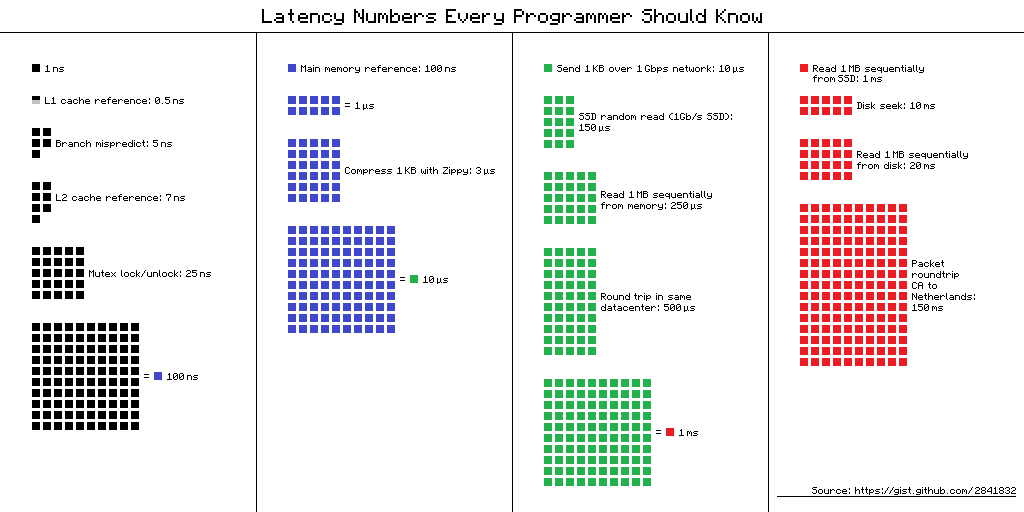
<p>This previous example is an optimization that the JVM is allowed to do. The JVM can do much more complex optimizations,
however, the outcome might be unexpected in a multi-threaded world! But why optimize then? The answer: <em>memory access
latency</em>!</p>
<div class="text-center">
  <p><img src="https://mouaad.aallam.com/assets/images/blog/latency_numbers.png" alt="latency numbers" /></p>
</div>

<h3 id="eventual-consistency">Eventual consistency</h3>

<p>A machine can have multiprocessors, and (at some level) each processor has its cache, which means, each processor loads
only the values it needs for its operations.
Let’s say we have two processors and the following program:</p>

<div class="language-java highlighter-rouge"><div class="highlight"><pre class="highlight"><code><span class="kd">class</span> <span class="nc">Caching</span> <span class="o">{</span>
    <span class="kt">boolean</span> <span class="n">flag</span> <span class="o">=</span> <span class="kc">true</span><span class="o">;</span>
    <span class="kt">int</span> <span class="n">count</span> <span class="o">=</span> <span class="mi">0</span><span class="o">;</span>

    <span class="kt">void</span> <span class="nf">thread1</span><span class="o">()</span> <span class="o">{</span>
        <span class="k">while</span> <span class="o">(</span><span class="n">flag</span><span class="o">)</span> <span class="n">count</span><span class="o">++;</span>
    <span class="o">}</span>

    <span class="kt">void</span> <span class="nf">thread2</span><span class="o">()</span> <span class="o">{</span>
        <span class="n">flag</span> <span class="o">=</span> <span class="kc">false</span><span class="o">;</span>
    <span class="o">}</span>
<span class="o">}</span> 
</code></pre></div></div>

<p>Let’s say processor <code class="language-plaintext highlighter-rouge">#1</code> will run the method <code class="language-plaintext highlighter-rouge">thread1()</code> and processor <code class="language-plaintext highlighter-rouge">#2</code> will run the method <code class="language-plaintext highlighter-rouge">thread2()</code>. An
optimization can be the following:</p>

<ul>
  <li>Since <code class="language-plaintext highlighter-rouge">thread1()</code> never modifies the <code class="language-plaintext highlighter-rouge">flag</code> variable, there is no need to load it from the main memory for each loop
check, only once to the cache is enough -&gt; the changes to <code class="language-plaintext highlighter-rouge">flag</code> might never be observed!</li>
  <li>Processor <code class="language-plaintext highlighter-rouge">#2</code> has no obligation to write it changes to the <code class="language-plaintext highlighter-rouge">flag</code> variable to the main memory! This means an
optimization can be to simply not do the operation at all!</li>
</ul>

<h3 id="13-atomicity">1.3 Atomicity</h3>

<p>The atomicity in Java is to consider all values are atomic, which means that the modification to a variable (for example
64 bit types like <code class="language-plaintext highlighter-rouge">long</code>  and <code class="language-plaintext highlighter-rouge">double</code>) to be done atomically.</p>

<p>Let’s consider the following example:</p>

<div class="language-java highlighter-rouge"><div class="highlight"><pre class="highlight"><code><span class="kd">class</span> <span class="nc">LongTearing</span> <span class="o">{</span>
    <span class="kt">long</span> <span class="n">foo</span> <span class="o">=</span> <span class="mi">0L</span><span class="o">;</span>

    <span class="kt">void</span> <span class="nf">thread1</span><span class="o">()</span> <span class="o">{</span>
        <span class="n">foo</span> <span class="o">=</span> <span class="mh">0x0000FFFF</span><span class="o">;</span> <span class="c1">// 2147483647 </span>
    <span class="o">}</span>

    <span class="kt">void</span> <span class="nf">thread2</span><span class="o">()</span> <span class="o">{</span>
        <span class="n">foo</span> <span class="o">=</span> <span class="mh">0xFFFF0000</span><span class="o">;</span> <span class="c1">// -2147483648 </span>
    <span class="o">}</span>
<span class="o">}</span> 
</code></pre></div></div>

<p>A 64 bit <code class="language-plaintext highlighter-rouge">long</code> variable, is written in two slots in the case of 32 memory, a problem can occur here:</p>

<ul>
  <li><code class="language-plaintext highlighter-rouge">thread1()</code> writes the <em>first half</em> of its value to memory <code class="language-plaintext highlighter-rouge">0000</code>.</li>
  <li><code class="language-plaintext highlighter-rouge">thread2()</code> writes the <em>second half</em> of its value to memory <code class="language-plaintext highlighter-rouge">0000</code>.</li>
  <li><code class="language-plaintext highlighter-rouge">thread1()</code> writes the <em>second half</em> of its value to memory <code class="language-plaintext highlighter-rouge">FFFF</code>.</li>
  <li><code class="language-plaintext highlighter-rouge">thread1()</code> writes the <em>first half</em> of its value to memory <code class="language-plaintext highlighter-rouge">FFFF</code>.</li>
  <li>The final value of the variable will be then: <code class="language-plaintext highlighter-rouge">0xFFFFFFFF</code> !!!</li>
</ul>

<h3 id="processor-optimization">Processor optimization</h3>

<p>Ordering operations sometimes are tied to the processor architecture. Optimization needs can be different for example
between ARM processors and x86 processors. ARM processors can be more aggressive because they are designed for
energy-consuming efficiency, than x86 processors which are more about calculation speed.</p>

<h2 id="what-is-the-java-memory-model">What is the Java memory model?</h2>

<p>Java memory model answers the question: what values can be observed upon reading from a specific field?</p>

<p>Formally specified by breaking down a Java program into <strong>actions</strong> and applying several <strong>orderings</strong> to these actions.
If one can derive a so-called <strong>happens-before</strong> ordering between a <strong>write action</strong> and a <strong>read action</strong> of one
field, the Java memory model guarantees that the read returns a particular value.</p>

<p>The Java memory machine guarantees <em>intra-thread consistency</em> equivalent to sequential consistency.</p>

<h3 id="building-blocks">Building blocks</h3>

<p>According to the Java memory model, using the following keywords, a programmer can indicate to the JVM to <em>refrain from
optimizations</em> that could otherwise cause concurrency issues:</p>

<ul>
  <li>Field-scoped: <code class="language-plaintext highlighter-rouge">final</code>, <code class="language-plaintext highlighter-rouge">volatile</code>.</li>
  <li>Method-scoped: <code class="language-plaintext highlighter-rouge">synchronized</code> (method/block), <code class="language-plaintext highlighter-rouge">java.util.concurrent .*</code>.</li>
</ul>

<p>In terms of the Java memory model, the above concepts introduce additional <strong>synchronization actions</strong> which introduce
additional (partial) <strong>orders</strong>. Without such modifiers, reads and writes might not be ordered what results in a data
race.<br />
A memory model is a <strong>trade-off</strong> between a language’s simplicity (consistency/atomicity) and its performance.</p>

<h3 id="volatile">Volatile</h3>

<p>Let’s take the following example:</p>

<div class="language-java highlighter-rouge"><div class="highlight"><pre class="highlight"><code><span class="kd">class</span> <span class="nc">DataRace</span> <span class="o">{</span>
    <span class="kt">boolean</span> <span class="n">ready</span> <span class="o">=</span> <span class="kc">false</span><span class="o">;</span>
    <span class="kt">int</span> <span class="n">answer</span> <span class="o">=</span> <span class="mi">0</span><span class="o">;</span>

    <span class="kt">void</span> <span class="nf">thread1</span><span class="o">()</span> <span class="o">{</span>
        <span class="k">while</span> <span class="o">(!</span><span class="n">ready</span><span class="o">)</span> <span class="o">;</span>
        <span class="k">assert</span> <span class="n">answer</span> <span class="o">==</span> <span class="mi">42</span><span class="o">;</span>
    <span class="o">}</span>

    <span class="kt">void</span> <span class="nf">thread2</span><span class="o">()</span> <span class="o">{</span>
        <span class="n">answer</span> <span class="o">=</span> <span class="mi">42</span><span class="o">;</span>   <span class="c1">// #1</span>
        <span class="n">ready</span> <span class="o">=</span> <span class="kc">true</span><span class="o">;</span>  <span class="c1">// #2</span>
    <span class="o">}</span>
<span class="o">}</span> 
</code></pre></div></div>

<p>The lines <code class="language-plaintext highlighter-rouge">#1</code> and <code class="language-plaintext highlighter-rouge">#2</code> can be reordered! This means, the assertion in method <code class="language-plaintext highlighter-rouge">thread1()</code> can fail in a multi-threaded
world!<br />
A solution ? The keyword <code class="language-plaintext highlighter-rouge">volatile</code>:</p>

<div class="language-java highlighter-rouge"><div class="highlight"><pre class="highlight"><code><span class="kd">class</span> <span class="nc">DataRace</span> <span class="o">{</span>
    <span class="kd">volatile</span> <span class="kt">boolean</span> <span class="n">ready</span> <span class="o">=</span> <span class="kc">false</span><span class="o">;</span>
    <span class="kt">int</span> <span class="n">answer</span> <span class="o">=</span> <span class="mi">0</span><span class="o">;</span>

    <span class="kt">void</span> <span class="nf">thread1</span><span class="o">()</span> <span class="o">{</span>
        <span class="k">while</span> <span class="o">(!</span><span class="n">ready</span><span class="o">)</span> <span class="o">;</span>
        <span class="k">assert</span> <span class="n">answer</span> <span class="o">==</span> <span class="mi">42</span><span class="o">;</span>
    <span class="o">}</span>

    <span class="kt">void</span> <span class="nf">thread2</span><span class="o">()</span> <span class="o">{</span>
        <span class="n">answer</span> <span class="o">=</span> <span class="mi">42</span><span class="o">;</span>   <span class="c1">// #1</span>
        <span class="n">ready</span> <span class="o">=</span> <span class="kc">true</span><span class="o">;</span>  <span class="c1">// #2</span>
    <span class="o">}</span>
<span class="o">}</span> 
</code></pre></div></div>

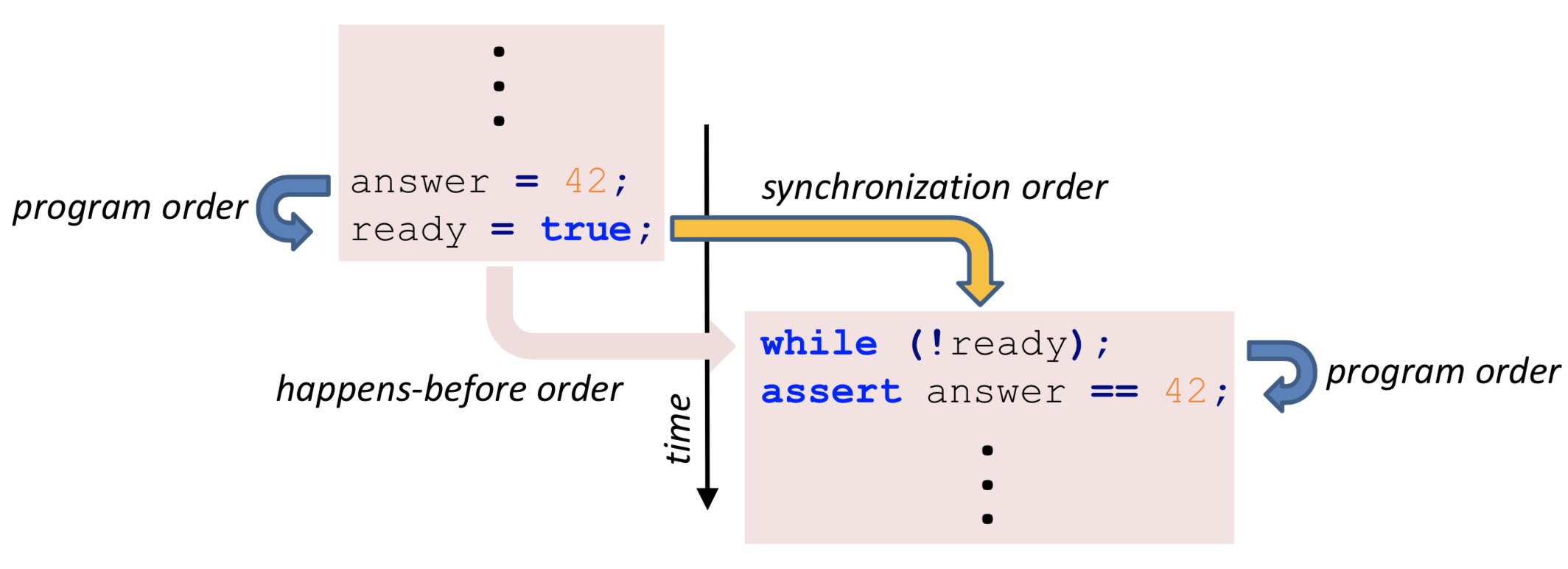
<p><code class="language-plaintext highlighter-rouge">volatile</code> implies for two threads with a write-read relationship on the <em>*same field*</em>, certain optimizations are not
allowed!</p>

<div class="text-center">
  <p><img src="https://mouaad.aallam.com/assets/images/blog/volatile_sync.png" alt="Volatile Synchronization" /></p>
</div>

<ol>
  <li>When a thread <em>writes</em> to a <code class="language-plaintext highlighter-rouge">volatile</code> variable, all of its previous writes are <em>guaranteed</em> to be visible to another
thread when that thread is reading the same value.</li>
  <li>Both threads <em>must align</em> “their” <code class="language-plaintext highlighter-rouge">volatile</code> value with that <em>in main memory</em> (flush).</li>
  <li>If the <code class="language-plaintext highlighter-rouge">volatile</code> value was a <code class="language-plaintext highlighter-rouge">long</code> or a <code class="language-plaintext highlighter-rouge">double</code> value, <em>word-tearing</em> was <em>forbidden</em>.</li>
</ol>

<h3 id="synchronized">Synchronized</h3>

<p>Another way to achieve the synchronization is by using: <code class="language-plaintext highlighter-rouge">synchronized</code>
Let’s check the following example assuming the second thread acquires the lock first:</p>

<div class="language-java highlighter-rouge"><div class="highlight"><pre class="highlight"><code><span class="kd">class</span> <span class="nc">DataRace</span> <span class="o">{</span>
    <span class="kt">boolean</span> <span class="n">ready</span> <span class="o">=</span> <span class="kc">false</span><span class="o">;</span>
    <span class="kt">int</span> <span class="n">answer</span> <span class="o">=</span> <span class="mi">0</span><span class="o">;</span>

    <span class="kd">synchronized</span> <span class="kt">void</span> <span class="nf">thread1</span><span class="o">()</span> <span class="o">{</span>
        <span class="k">while</span> <span class="o">(!</span><span class="n">ready</span><span class="o">)</span> <span class="o">;</span>
        <span class="k">assert</span> <span class="n">answer</span> <span class="o">==</span> <span class="mi">42</span><span class="o">;</span>
    <span class="o">}</span>

    <span class="kd">synchronized</span> <span class="kt">void</span> <span class="nf">thread2</span><span class="o">()</span> <span class="o">{</span> <span class="c1">//Assuming this is called 1st</span>
        <span class="n">answer</span> <span class="o">=</span> <span class="mi">42</span><span class="o">;</span>
        <span class="n">ready</span> <span class="o">=</span> <span class="kc">true</span><span class="o">;</span>
    <span class="o">}</span>
<span class="o">}</span> 
</code></pre></div></div>

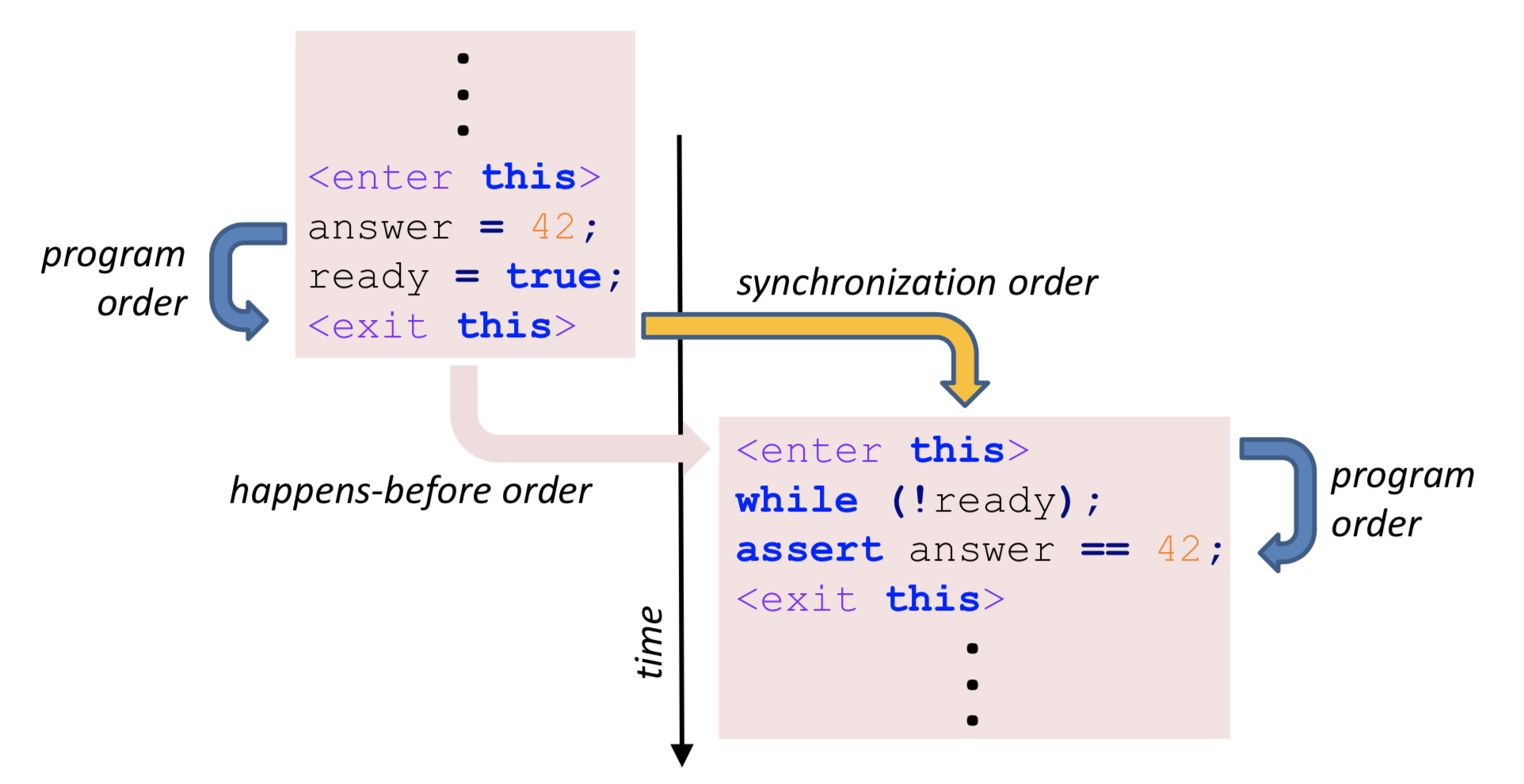
<p>When a thread <em>releases</em> a monitor, all of its previous writes are <em>guaranteed</em> to be visible to another thread after
that thread is <em>locking the same monitor.</em>. This only applies for two threads with an <em>*unlock-lock relationship*</em> on
the same monitor!</p>
<div class="text-center">
  <p><img src="https://mouaad.aallam.com/assets/images/blog/synchronized_sync.png" alt="Synchronized Synchronization" /></p>
</div>

<h3 id="thread-life-cycle-semantics">Thread life-cycle semantics</h3>

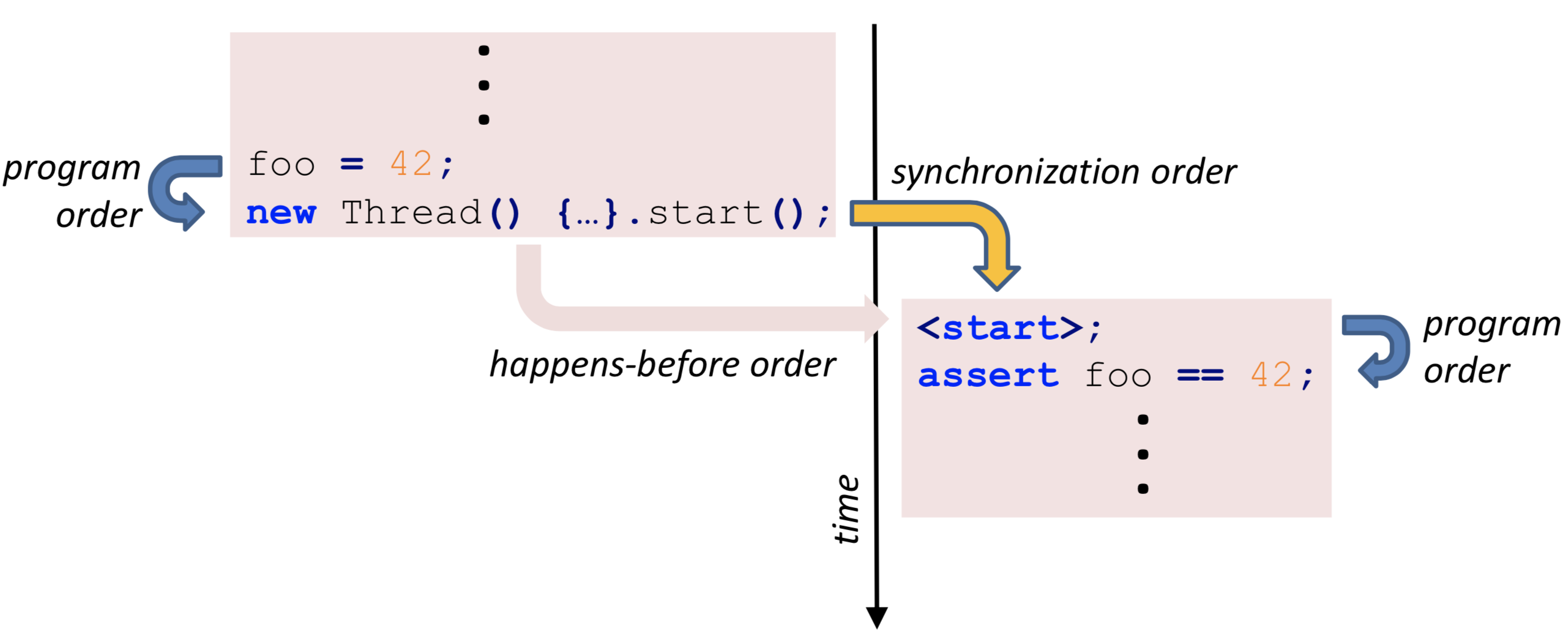
<p>When a thread starts another thread, the started thread is guaranteed to see all values that were set by the starting
thread.</p>

<div class="language-java highlighter-rouge"><div class="highlight"><pre class="highlight"><code><span class="kd">class</span> <span class="nc">ThreadLifeCycle</span> <span class="o">{</span>
    <span class="kt">int</span> <span class="n">foo</span> <span class="o">=</span> <span class="mi">0</span><span class="o">;</span>

    <span class="kt">void</span> <span class="nf">method</span><span class="o">()</span> <span class="o">{</span>
        <span class="n">foo</span> <span class="o">=</span> <span class="mi">42</span><span class="o">;</span>
        <span class="k">new</span> <span class="nf">Thread</span><span class="o">()</span> <span class="o">{</span>
            <span class="nd">@Override</span>
            <span class="kd">public</span> <span class="kt">void</span> <span class="nf">run</span><span class="o">()</span> <span class="o">{</span>
                <span class="k">assert</span> <span class="n">foo</span> <span class="o">==</span> <span class="mi">42</span><span class="o">;</span>
            <span class="o">}</span>
        <span class="o">}.</span><span class="na">start</span><span class="o">();</span>
    <span class="o">}</span>
<span class="o">}</span> 
</code></pre></div></div>

<div class="text-center">
  <p><img src="https://mouaad.aallam.com/assets/images/blog/thread_lifecycle.png" alt="Thread Life-cycle" /></p>
</div>
<p>Similarly, a thread that joins another thread is guaranteed to see all values that were set by the joined thread.</p>

<h3 id="final-field-semantics">Final field semantics</h3>

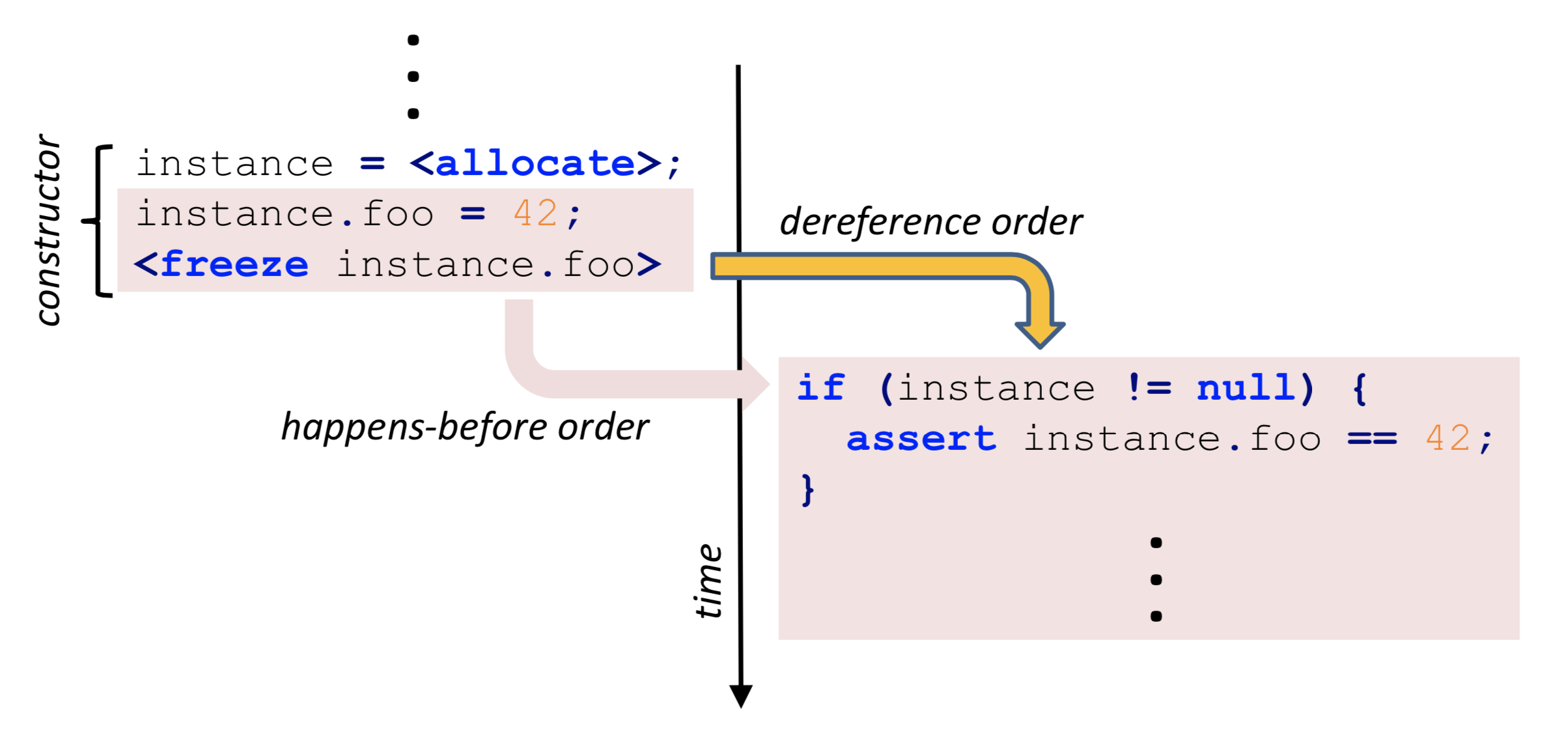
<p>When a thread creates an instance, the instance’s <code class="language-plaintext highlighter-rouge">final</code> fields are <em>frozen</em>. The Java memory model requires a field’s
initial value to be visible in the initialized form to other threads.</p>
<div class="text-center">
  <p><img src="https://mouaad.aallam.com/assets/images/blog/freeze.png" alt="Final Synchronization" /></p>
</div>
<p>This requirement also holds for properties that are dereferenced via a <code class="language-plaintext highlighter-rouge">final</code> field, even if the field value’s properties are not final themselves (memory-chain order).</p>

<h3 id="external-actions">External actions</h3>

<p>A JIT-compiler <em>cannot</em> determine the side-effects of a <em>native</em> operation. Therefore, external actions are <em>guaranteed</em>
to <em>not be reordered</em>.</p>

<div class="language-java highlighter-rouge"><div class="highlight"><pre class="highlight"><code><span class="kd">class</span> <span class="nc">Externalization</span> <span class="o">{</span>
    <span class="kt">int</span> <span class="n">foo</span> <span class="o">=</span> <span class="mi">0</span><span class="o">;</span>

    <span class="kt">void</span> <span class="nf">method</span><span class="o">()</span> <span class="o">{</span>
        <span class="n">foo</span> <span class="o">=</span> <span class="mi">42</span><span class="o">;</span>
        <span class="n">jni</span><span class="o">();</span> <span class="c1">// Not re-ordered</span>
    <span class="o">}</span>

    <span class="kd">native</span> <span class="kt">void</span> <span class="nf">jni</span><span class="o">();</span>
<span class="o">}</span> 
</code></pre></div></div>

<p>External actions include JNI, socket communication, file system operations, or interaction with the console (
non-exclusive list).</p>

<h3 id="thread-divergence-actions">Thread-divergence actions</h3>

<p>Thread-divergence actions are <em>guaranteed to not be reordered</em>. This prevents surprising outcomes of actions that might
never be reached.</p>

<div class="language-java highlighter-rouge"><div class="highlight"><pre class="highlight"><code><span class="kd">class</span> <span class="nc">ThreadDivergence</span> <span class="o">{</span>
    <span class="kt">int</span> <span class="n">foo</span> <span class="o">=</span> <span class="mi">42</span><span class="o">;</span>

    <span class="kt">void</span> <span class="nf">thread1</span><span class="o">()</span> <span class="o">{</span>
        <span class="k">while</span> <span class="o">(</span><span class="kc">true</span><span class="o">)</span> <span class="o">;</span>
        <span class="n">foo</span> <span class="o">=</span> <span class="mi">0</span><span class="o">;</span> <span class="c1">// Not re-ordered</span>
    <span class="o">}</span>

    <span class="kt">void</span> <span class="nf">thread2</span><span class="o">()</span> <span class="o">{</span>
        <span class="k">assert</span> <span class="n">foo</span> <span class="o">==</span> <span class="mi">42</span><span class="o">;</span>
    <span class="o">}</span>
<span class="o">}</span> 
</code></pre></div></div>

<p>In the previous example, in the method <code class="language-plaintext highlighter-rouge">thread1()</code> the line <code class="language-plaintext highlighter-rouge">foo = 0</code> is unreachable. Thus not re-ordered.</p>

<h2 id="in-practice">In Practice</h2>

<p>The following are some practical examples of Java Memory Model use (or misuse).</p>

<h3 id="double-checking">Double-checking</h3>

<p>The following is a lazy instance creation example:</p>

<div class="language-java highlighter-rouge"><div class="highlight"><pre class="highlight"><code><span class="kd">class</span> <span class="nc">DoubleChecked</span> <span class="o">{</span>
    <span class="kd">static</span> <span class="kd">volatile</span> <span class="nc">DoubleChecked</span> <span class="n">instance</span><span class="o">;</span>

    <span class="kd">static</span> <span class="nc">DoubleChecked</span> <span class="nf">getInstance</span><span class="o">()</span> <span class="o">{</span>
        <span class="k">if</span> <span class="o">(</span><span class="n">instance</span> <span class="o">==</span> <span class="kc">null</span><span class="o">)</span> <span class="o">{</span>
            <span class="kd">synchronized</span> <span class="o">(</span><span class="nc">DoubleChecked</span><span class="o">.</span><span class="na">class</span><span class="o">)</span> <span class="o">{</span>
                <span class="k">if</span> <span class="o">(</span><span class="n">instance</span> <span class="o">==</span> <span class="kc">null</span><span class="o">)</span> <span class="o">{</span>
                    <span class="n">instance</span> <span class="o">=</span> <span class="k">new</span> <span class="nc">DoubleChecked</span><span class="o">();</span>
                <span class="o">}</span>
            <span class="o">}</span>
        <span class="o">}</span>
        <span class="k">return</span> <span class="n">instance</span><span class="o">;</span>
    <span class="o">}</span>

    <span class="kt">int</span> <span class="n">foo</span> <span class="o">=</span> <span class="mi">0</span><span class="o">;</span>

    <span class="nc">DoubleChecked</span><span class="o">()</span> <span class="o">{</span>
        <span class="n">foo</span> <span class="o">=</span> <span class="mi">42</span><span class="o">;</span>
    <span class="o">}</span>

    <span class="kt">void</span> <span class="nf">method</span><span class="o">()</span> <span class="o">{</span>
        <span class="k">assert</span> <span class="n">foo</span> <span class="o">==</span> <span class="mi">42</span><span class="o">;</span>
    <span class="o">}</span>
<span class="o">}</span> 
</code></pre></div></div>

<p>This example works because of <code class="language-plaintext highlighter-rouge">volatile</code>, omitting it may cause having an instance of an object created, but
uninitialized!</p>

<h3 id="arrays">Arrays</h3>

<p>Declaring an array to be <code class="language-plaintext highlighter-rouge">volatile</code> <em>does not</em> make its elements <code class="language-plaintext highlighter-rouge">volatile</code>! In the following example, there is no
write-read edge because the array is only read by any thread:</p>

<div class="language-java highlighter-rouge"><div class="highlight"><pre class="highlight"><code><span class="kd">class</span> <span class="nc">DataRace</span> <span class="o">{</span>
    <span class="kd">volatile</span> <span class="kt">boolean</span><span class="o">[]</span> <span class="n">ready</span> <span class="o">=</span> <span class="k">new</span> <span class="kt">boolean</span><span class="o">[]{</span><span class="kc">false</span><span class="o">};</span>
    <span class="kt">int</span> <span class="n">answer</span> <span class="o">=</span> <span class="mi">0</span><span class="o">;</span>

    <span class="kt">void</span> <span class="nf">thread1</span><span class="o">()</span> <span class="o">{</span>
        <span class="k">while</span> <span class="o">(!</span><span class="n">ready</span><span class="o">[</span><span class="mi">0</span><span class="o">])</span> <span class="o">;</span>
        <span class="k">assert</span> <span class="n">answer</span> <span class="o">==</span> <span class="mi">42</span><span class="o">;</span>
    <span class="o">}</span>

    <span class="kt">void</span> <span class="nf">thread2</span><span class="o">()</span> <span class="o">{</span>
        <span class="n">answer</span> <span class="o">=</span> <span class="mi">42</span><span class="o">;</span>
        <span class="n">ready</span><span class="o">[</span><span class="mi">0</span><span class="o">]</span> <span class="o">=</span> <span class="kc">true</span><span class="o">;</span>
    <span class="o">}</span>
<span class="o">}</span> 
</code></pre></div></div>

<p>For such volatile element access: <code class="language-plaintext highlighter-rouge">java.util.concurrent.atomic.AtomicIntegerArray</code>.</p>

<h2 id="sources">Sources</h2>

<ul>
  <li><a href="https://en.wikipedia.org/wiki/Java_memory_model">Java memory model - Wikipedia</a></li>
  <li><a href="https://download.oracle.com/otndocs/jcp/memory_model-1.0-pfd-spec-oth-JSpec/">JSR-133 Java Memory Model and Thread Specification 1.0 Proposed Final Draft</a></li>
  <li><a href="https://en.wikipedia.org/wiki/Happened-before">Happened-before - Wikipedia</a></li>
  <li><a href="http://tutorials.jenkov.com/java-concurrency/java-memory-model.html">Java Memory Model - jenkov</a></li>
  <li><a href="https://www.youtube.com/watch?v=XgiXKPEILoc">The Java Memory Model for Practitioners</a></li>
  <li><a href="https://shipilev.net/blog/2016/close-encounters-of-jmm-kind/">Close Encounters of The Java Memory Model Kind</a></li>
</ul>]]></content>


      <author>
        <name></name>
        
        
      </author>


        <category term="Java" />
      
        <category term="JVM" />


        <summary type="html"><![CDATA[Deep dive into Java Memory Model covering sequential consistency, happens-before relationships, volatile, synchronized, and concurrency optimization patterns.]]></summary>


        <media:thumbnail xmlns:media="http://search.yahoo.com/mrss/" url="https://mouaad.aallam.com/assets/images/blog/cart-observing-wrong.png" />
        <media:content medium="image" url="https://mouaad.aallam.com/assets/images/blog/cart-observing-wrong.png" xmlns:media="http://search.yahoo.com/mrss/" />
      
    </entry>
  
    <entry>
      

      <title type="html">JVM Architecture</title>
      <link href="https://mouaad.aallam.com/java-virtual-machine-architecture/" rel="alternate" type="text/html" title="JVM Architecture" />
      <published>2019-08-08T16:16:00+00:00</published>
      <updated>2019-08-08T16:16:00+00:00</updated>
      <id>https://mouaad.aallam.com/java-virtual-machine-architecture</id>
      
      
        <content type="html" xml:base="https://mouaad.aallam.com/java-virtual-machine-architecture/"><![CDATA[<div class="text-center">
  <p><img src="https://mouaad.aallam.com/assets/images/blog/JVM.png" alt="Java" width="50%" /></p>
</div>

<p>Java source codes are compiled into an intermediate state called <strong>bytecode</strong> (i.e. <strong>.class</strong> file) using the Java compiler (<strong>javac</strong>). The Java Virtual Machine a.k.a <strong>JVM</strong> interprets the bytecode (without further recompilations) into native machine language. Therefore, bytecode acts as a <strong>platform-independent</strong> intermediary state which is <strong>portable</strong> among any JVM regardless of underlying OS and hardware architecture.</p>

<p><em><strong>The JVM is a specification</strong></em>. Vendors are free to customize, innovate, and improve its performance during the implementation.</p>

<div class="text-center">
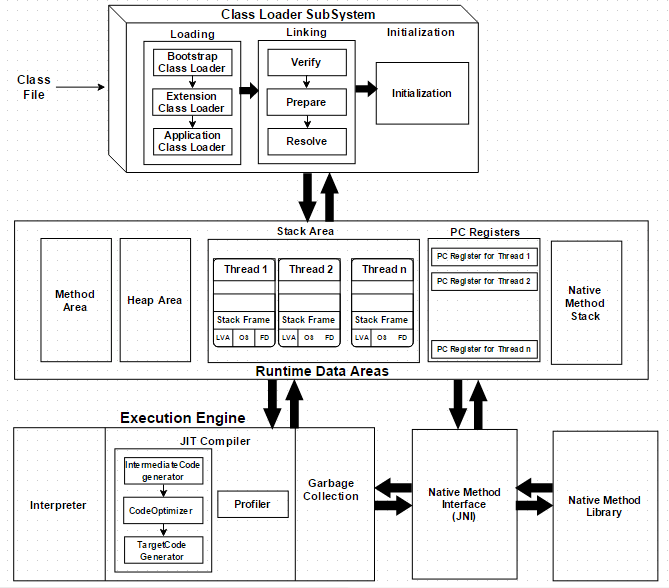
  <p><img src="https://mouaad.aallam.com/assets/images/blog/JVM_Architecture.png" alt="JVM Architecture" width="75%" /></p>
  <figcaption class="caption">Java Virtual Machine Architecture</figcaption>
</div>

<h2 id="1-class-loader-subsystem">1. Class Loader Subsystem</h2>
<p>The <strong>JVM resides on the RAM</strong>. During execution, using the Class Loader subsystem, the class files are brought on to the RAM. This is called Java’s <strong>dynamic class loading</strong> functionality. It loads, links, and initializes the class file (<code class="language-plaintext highlighter-rouge">.class</code>) when it refers to a class for the first time at runtime (not compile time).</p>

<h3 id="11-loading">1.1. Loading</h3>
<ul>
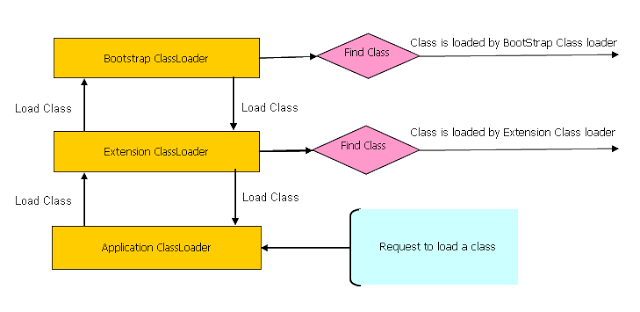
  <li><strong>Bootstrap Class Loader</strong> loads standard JDK classes such as core Java API classes (e.g. <code class="language-plaintext highlighter-rouge">java.lang.*</code> package classes) from <code class="language-plaintext highlighter-rouge">$JAVA_HOME/jre/rt.jar</code>. The class loader acts as parent of all class loaders in Java;</li>
  <li><strong>Extension Class Loader</strong> delegates class loading request to its parent, Bootstrap and if unsuccessful, loads classes from the extensions directories (e.g. security extension functions) in extension path  <code class="language-plaintext highlighter-rouge">$JAVA_HOME/jre/lib/ext</code> or any other directory specified by the <code class="language-plaintext highlighter-rouge">java.ext.dirs</code> system property;</li>
  <li><strong>System/Application Class Loader</strong> loads application specific classes from system class path, that can be set while invoking a program using <code class="language-plaintext highlighter-rouge">-cp</code> or <code class="language-plaintext highlighter-rouge">-classpath</code> command line options.</li>
</ul>

<div class="text-center">
  <p><img src="https://mouaad.aallam.com/assets/images/blog/java_class_loaders.png" alt="Java Class Loaders" /></p>
</div>

<p>Note: It is possible to directly create a <em>User-defined Class Loader</em> on the code itself.</p>

<h3 id="12-linking">1.2. Linking</h3>
<p>Linking is to verify and prepare a loaded class or interface, its direct superclasses and superinterfaces, and its element type as necessary, while following the below properties:</p>

<ul>
  <li><strong>Verification</strong>: ensure the correctness of <code class="language-plaintext highlighter-rouge">.class</code> file, If verification fails, it throws runtime errors (<code class="language-plaintext highlighter-rouge">java.lang.VerifyError</code>). For instance, the following checks are performed:
    <ul>
      <li>consistent and correctly formatted symbol table;</li>
      <li>final methods / classes not overridden;</li>
      <li>methods respect access control keywords;</li>
      <li>methods have correct number and type of parameters;</li>
      <li>bytecode doesn’t manipulate stack incorrectly;</li>
      <li>variables are initialized before being read;</li>
      <li>variables are a value of the correct type.</li>
    </ul>
  </li>
  <li><strong>Preparation</strong>: allocate memory for static storage and any data structures used by the JVM such as method tables. Static fields are created and initialized to their default values, however, no initializers or code is executed at this stage;</li>
  <li><strong>Resolution</strong>: replace symbolic references from the type with direct references. It is done by searching into method area to locate the referenced entity.</li>
</ul>

<h3 id="13-initialization">1.3. Initialization</h3>
<p>The initialization logic of each loaded class or interface will be executed (e.g. calling the constructor of a class). Since JVM is multi-threaded, initialization of a class or interface should happen very carefully (i.e. make it <strong>thread safe</strong>).</p>

<h2 id="2-runtime-data-areas">2. Runtime Data Areas</h2>
<p>Runtime Data Areas are the memory areas assigned when the JVM program runs on the OS.<br />
In addition to reading <code class="language-plaintext highlighter-rouge">.class</code> files, the Class Loader subsystem generates corresponding binary data and save the following information in the Method area for each class separately:</p>
<ul>
  <li>fully qualified class name (FQCN) of the loaded class and its immediate parent class;</li>
  <li>whether <code class="language-plaintext highlighter-rouge">.class</code> file is related to a Class, Interface or Enum;</li>
  <li>modifiers, static variables, and method information etc.</li>
</ul>

<p>For every loaded <code class="language-plaintext highlighter-rouge">.class</code> file, it creates exactly one <strong>Class</strong> object to represent the file in the Heap memory. This <strong>Class</strong> object can be used to read class level information (class name, parent name, methods, variable information, static variables etc.) later in the code.</p>

<h3 id="21-method-area-shared">2.1 Method Area (Shared)</h3>
<p>This is a <em><strong>shared resource</strong></em> (only 1 method area per JVM). All JVM threads share this same method area, which means the access to the method data and the process of dynamic linking must be <strong>thread safe</strong>.<br />
Method area stores <strong>class level data</strong> (including <strong>static variables</strong>) such as:</p>
<ul>
  <li>ClassLoader reference;</li>
  <li>runtime constant pool;</li>
  <li>field data;</li>
  <li>method data;</li>
  <li>method code.</li>
</ul>

<h3 id="22-heap-area-shared">2.2 Heap Area (Shared)</h3>
<p>This is also a <strong>shared resource</strong> (only 1 heap area per JVM). Information of all <strong>objects</strong> and their corresponding <strong>instance variables and arrays</strong> are stored in the Heap area. Heap area is a great target for GC.</p>

<h3 id="23-stack-area-per-thread">2.3. Stack Area (Per thread)</h3>
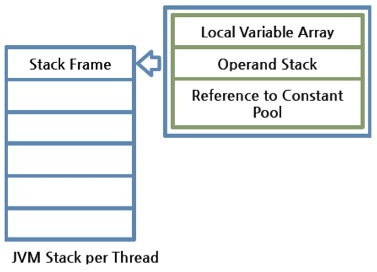
<p>This is not a shared resource <em>(thread safe)</em>. Every JVM thread has a separate <strong>runtime stack</strong> to store <strong>method calls</strong>. For every such method call, one entry will be created and added (pushed) into the top of runtime stack and such entry it is called a <strong>Stack Frame</strong>.</p>

<div class="text-center">
  <p><img src="https://mouaad.aallam.com/assets/images/blog/JVM_stack_configuration.png" alt="JVM Stack Configuration" /></p>
</div>

<p>A Stack Frame is divided into three sub-entities:</p>
<ul>
  <li><strong>Local Variable Array</strong>: contains local variables and their values;</li>
  <li><strong>Operand Stack</strong>: this acts as a runtime workspace to perform any intermediate operation. Each method exchanges data between the Operand stack and the local variable array, and pushes or pops other method invoke results;</li>
  <li><strong>Frame Data</strong>: all symbols related to the method are stored here. For exceptions, the catch block information will also be maintained in the frame data.</li>
</ul>

<p>The frame is removed (popped) when the method returns normally or if an uncaught exception is thrown during the method invocation.
Since these are runtime stack frames, after a thread terminates, its stack frame will also be destroyed by JVM.</p>

<p>The stack frame is size fixed, however, the stack itself can be a dynamic or fixed size. If a thread requires a larger stack than allowed a <code class="language-plaintext highlighter-rouge">StackOverflowError</code> is thrown. If a thread requires a new frame and there isn’t enough memory to allocate it then an <code class="language-plaintext highlighter-rouge">OutOfMemoryError</code> is thrown.</p>

<h3 id="24-pc-registers--per-thread">2.4. PC Registers  (Per thread)</h3>
<p>For each JVM thread, when the thread starts, a separate PC (<em>Program Counter</em>) Register gets created in order to hold the address of currently-executing instruction (memory address in the method area). If the current method is native then the PC is undefined. Once the execution finishes, the PC register gets updated with the address of next instruction.</p>

<h3 id="25-native-method-stack-per-thread">2.5. Native Method Stack (Per thread)</h3>
<p>There is a direct mapping between a Java thread and a native operating system thread. After preparing all the state for a Java thread, a separate native stack also gets created in order to store native method information invoked through JNI (Java Native Interface).</p>

<p>Once the native thread has been created and initialized, it invokes the <code class="language-plaintext highlighter-rouge">run()</code> method in the Java thread. When the thread terminates, all resources for both the native and Java threads are released.
The native thread is reclaimed once the Java thread terminates. The operating system is therefore responsible for scheduling all threads and dispatching them to any available CPU.</p>

<h2 id="3-execution-engine">3. Execution Engine</h2>
<p>Execution Engine executes the instructions in the bytecode line-by-line by reading the data assigned to Runtime Data Areas.</p>

<h3 id="31-interpreter">3.1. Interpreter</h3>
<p>The interpreter <em>interprets</em> the <em>bytecode</em> and executes the instructions one-by-one. Hence, it can interpret one bytecode line quickly, but executing the interpreted result is a slower task. The disadvantage is that when one method is called multiple times, each time a new interpretation and a slower execution are required.</p>

<h3 id="32-just-in-time-jit-compiler">3.2. Just-In-Time (JIT) Compiler</h3>
<p>The JIT compiler, compiles the bytecode to native code. Then for repeated method calls, it directly provides the native code.</p>

<p>However, even for JIT compiler, it takes more time for compiling than for the interpreter to interpret. For a code segment that executes just once, it is better to interpret it instead of compiling. Also the native code is stored in the cache, which is an expensive resource. With these circumstances, JIT compiler internally checks the frequency of each method call and decides to compile each only when the selected method has occurred more than a certain level of times. This idea of <strong>adaptive compiling</strong> has been used in Oracle Hotspot VMs.</p>

<p>Execution Engine qualifies to become a key subsystem when introducing performance optimizations by JVM vendors. Among such efforts, the following 4 components can largely improve its performance:</p>
<ul>
  <li><strong>Intermediate Code Generator</strong> produces <strong>intermediate code</strong>;</li>
  <li><strong>Code Optimizer</strong> is responsible for optimizing the intermediate code generated;</li>
  <li><strong>Target Code Generator</strong> is responsible for generating <strong>Native Code</strong> (i.e.<strong>Machine Code</strong>);</li>
  <li><strong>Profiler</strong> is a special component, responsible for finding performance bottlenecks a.k.a.<strong>hotspots</strong>.</li>
</ul>

<h3 id="33-garbage-collector">3.3. Garbage Collector</h3>
<p>As long as an object is being referenced, the JVM considers it alive. Once an object is no longer referenced and therefore is not reachable by the application code, the garbage collector removes it and reclaims the unused memory.</p>

<h2 id="4-java-native-interface-jni">4. Java Native Interface (JNI)</h2>
<p>This interface is used to interact with Native Method Libraries. This enables JVM to call C/C++ libraries and to be called by C/C++ libraries which may be specific to hardware.</p>

<h2 id="5-native-method-libraries">5. Native Method Libraries</h2>
<p>This is a collection of C/C++ Native Libraries which is required for the Execution Engine and can be accessed through the provided Native Interface.</p>

<h2 id="6-jvm-threads">6. JVM Threads</h2>
<p>The JVM concurrently runs multiple threads, some of these threads carry the programming logic and are created by the program (<strong>application threads</strong>), while the rest is created by JVM itself to undertake background tasks in the system (<strong>system threads</strong>).</p>

<p>The major application thread is the <strong>main thread</strong> which is created as part of invoking <code class="language-plaintext highlighter-rouge">public static void main(String[])</code> and all other application threads are created by this main thread. Application threads perform tasks such as executing instructions starting with <code class="language-plaintext highlighter-rouge">main()</code> method, creating objects in Heap area if it finds <code class="language-plaintext highlighter-rouge">new</code> keyword in any method logic etc.</p>

<p>The major system threads are as follows:</p>
<ul>
  <li><strong>Compiler threads</strong>: At runtime, compilation of bytecode to native code is undertaken by these threads;</li>
  <li><strong>GC threads</strong>: All the GC related activities are carried out by these threads;</li>
  <li><strong>Periodic task thread</strong>: The timer events (i.e. interrupts) to schedule execution of periodic operations are performed by this thread;</li>
  <li><strong>Signal dispatcher thread</strong>: This thread receives signals sent to the JVM process and handle them inside the JVM by calling the appropriate JVM methods;</li>
  <li><strong>VM thread</strong>: This thread waits for operations to appear that require the JVM to reach a safe-point where modifications to the heap can not occur. The type of operations performed by this thread are “stop-the-world” garbage collections, thread stack dumps, thread suspension and biased locking revocation.</li>
</ul>

<h2 id="7-conclusion">7. Conclusion</h2>
<p>Java is considered as both compiled (high-level java code into bytecode) and interpreted (bytecode into native machine code). By design, Java is slow due to dynamic linking and run-time interpreting, however, JIT compiler compensate for the disadvantages of the interpreter for repeating operations by keeping a native code instead of bytecode.</p>

<h2 id="8-useful-commands">8. Useful Commands</h2>
<ul>
  <li><code class="language-plaintext highlighter-rouge">javac</code>: Java compiler;</li>
  <li><code class="language-plaintext highlighter-rouge">javap</code>: Dump <code class="language-plaintext highlighter-rouge">.class</code> data;</li>
  <li><code class="language-plaintext highlighter-rouge">-XX:+PrintCompilation</code>: Log every time a method is compiled to native code;</li>
  <li><code class="language-plaintext highlighter-rouge">-XX:+PrintInlining</code>: Display a tree how methods has been inlined;</li>
  <li><code class="language-plaintext highlighter-rouge">-XX:+PrintAssembly</code>: Look at the native code that JVM is outputting;</li>
  <li><code class="language-plaintext highlighter-rouge">jps</code>: lists running  Java processes;</li>
  <li><code class="language-plaintext highlighter-rouge">jcmd</code>: used to send diagnostic command requests to the JVM
    <ul>
      <li><code class="language-plaintext highlighter-rouge">jcmd</code> (without any parameters): list all JVM processes;</li>
      <li><code class="language-plaintext highlighter-rouge">jcmd [PID] help</code>: show available commands;</li>
      <li><code class="language-plaintext highlighter-rouge">jcmd [PID] GC.heap_dump [PATH]</code>: heap dump;</li>
      <li><code class="language-plaintext highlighter-rouge">jcmd [PID] Thread.print</code>: Thread dump.</li>
    </ul>
  </li>
</ul>

<h2 id="9-sources">9. Sources</h2>
<ul>
  <li><a href="http://blog.jamesdbloom.com/JVMInternals.html">JVM Internals</a></li>
  <li><a href="https://www.cubrid.org/blog/understanding-jvm-internals/">Understanding JVM Internals</a></li>
  <li><a href="https://javatutorial.net/jvm-explained">JVM Explained</a></li>
  <li><a href="https://javainterviewpoint.com/java-virtual-machine-architecture-in-java/">Java Virtual Machine Architecture in Java</a></li>
  <li><a href="https://www.geeksforgeeks.org/jvm-works-jvm-architecture/">How JVM Works - JVM Architecture</a></li>
  <li><a href="https://www.guru99.com/java-virtual-machine-jvm.html">Java Virtual Machine (JVM) &amp; its Architecture</a></li>
</ul>]]></content>


      <author>
        <name></name>
        
        
      </author>


        <category term="Java" />
      
        <category term="JVM" />


        <summary type="html"><![CDATA[Complete guide to Java Virtual Machine architecture: class loading, memory areas, execution engine, JIT compiler, and garbage collection explained.]]></summary>


        <media:thumbnail xmlns:media="http://search.yahoo.com/mrss/" url="https://mouaad.aallam.com/assets/images/blog/JVM.png" />
        <media:content medium="image" url="https://mouaad.aallam.com/assets/images/blog/JVM.png" xmlns:media="http://search.yahoo.com/mrss/" />
      
    </entry>
  
    <entry>
      

      <title type="html">Reactive Programming with RxJava</title>
      <link href="https://mouaad.aallam.com/reactivex-rxjava/" rel="alternate" type="text/html" title="Reactive Programming with RxJava" />
      <published>2019-01-29T23:06:00+00:00</published>
      <updated>2019-01-29T23:06:00+00:00</updated>
      <id>https://mouaad.aallam.com/reactivex:-rxjava</id>
      
      
        <content type="html" xml:base="https://mouaad.aallam.com/reactivex-rxjava/"><![CDATA[<div class="text-center">
  <p><img src="https://mouaad.aallam.com/assets/images/blog/reactivex.png" alt="ReactiveX" width="25%" /></p>
  <figcaption class="caption">Reactive Extensions (ReactiveX)</figcaption>
</div>
<p><br /></p>

<blockquote>
  <p><strong>Update Note</strong>: This RxJava series was written for RxJava 2.x (2019). RxJava 3.x introduced breaking changes and improvements. Core concepts remain the same, but some APIs have changed. Refer to the <a href="https://github.com/ReactiveX/RxJava/wiki/What's-different-in-3.0">RxJava 3.x migration guide</a> for differences.</p>
</blockquote>

<p>Interested in Reactive Extensions and RxJava, I enjoyed reading the excellent book: <a href="https://www.amazon.com/Learning-RxJava-Thomas-Nield/dp/1787120422">Learning RxJava</a> by Thomas Nield, and the following are my notes.</p>

<h2 id="why-rxjava">Why RxJava?</h2>
<ul>
  <li>Concurrency, event handling, obsolete data states, and exception recovery.</li>
  <li>Maintainable, reusable, and evolvable.</li>
  <li>Allows applications to be tactical and evolvable while maintaining stability in production.</li>
</ul>

<h2 id="quickstart">Quickstart</h2>
<p>In ReactiveX, the core type is the <code class="language-plaintext highlighter-rouge">Observable</code> which essentially pushes things. A given <code class="language-plaintext highlighter-rouge">Observable&lt;T&gt;</code> pushes things of type <code class="language-plaintext highlighter-rouge">T</code> through a series of operators until it arrives at an <code class="language-plaintext highlighter-rouge">Observer</code> that consumes the items.
The following is an example of an <code class="language-plaintext highlighter-rouge">Observable&lt;String&gt;</code> that pushes three <code class="language-plaintext highlighter-rouge">String</code> objects:</p>
<div class="language-kotlin highlighter-rouge"><div class="highlight"><pre class="highlight"><code><span class="k">fun</span> <span class="nf">main</span><span class="p">()</span> <span class="p">{</span>
    <span class="kd">val</span> <span class="py">observable</span> <span class="p">=</span> <span class="nc">Observable</span><span class="p">.</span><span class="nf">just</span><span class="p">(</span><span class="s">"Hello"</span><span class="p">,</span> <span class="s">"world"</span><span class="p">,</span> <span class="s">"!"</span><span class="p">)</span>
<span class="p">}</span>
</code></pre></div></div>
<p>Running this <code class="language-plaintext highlighter-rouge">main</code> method isn’t doing anything other than declare a <code class="language-plaintext highlighter-rouge">Observable&lt;String&gt;</code>. To make this <code class="language-plaintext highlighter-rouge">Observable</code> actually emit these three strings, an <code class="language-plaintext highlighter-rouge">Observer</code> need to <em>subscribe</em> to it and receive the items:</p>
<div class="language-kotlin highlighter-rouge"><div class="highlight"><pre class="highlight"><code><span class="k">fun</span> <span class="nf">main</span><span class="p">()</span> <span class="p">{</span>
    <span class="kd">val</span> <span class="py">observable</span> <span class="p">=</span> <span class="nc">Observable</span><span class="p">.</span><span class="nf">just</span><span class="p">(</span><span class="s">"Hello"</span><span class="p">,</span> <span class="s">"world"</span><span class="p">,</span> <span class="s">"!"</span><span class="p">)</span>
    <span class="n">observable</span><span class="p">.</span><span class="nf">subscribe</span> <span class="p">{</span>
        <span class="nf">print</span><span class="p">(</span><span class="s">"$it "</span><span class="p">)</span>
    <span class="p">}</span>
<span class="p">}</span>
</code></pre></div></div>
<p>This time, the output is the following:</p>
<div class="language-plaintext highlighter-rouge"><div class="highlight"><pre class="highlight"><code>Hello world! 
</code></pre></div></div>
<p>What happened here is that <code class="language-plaintext highlighter-rouge">Observable&lt;String&gt;</code> pushed each <code class="language-plaintext highlighter-rouge">String</code> object once at a time to the <code class="language-plaintext highlighter-rouge">Observer</code> lambda.</p>

<p>It’s possible to use several operators between <code class="language-plaintext highlighter-rouge">Observable</code> and <code class="language-plaintext highlighter-rouge">Observer</code> to transform each pushed item or manipulate them, the following is an example of <code class="language-plaintext highlighter-rouge">map()</code>:</p>
<div class="language-kotlin highlighter-rouge"><div class="highlight"><pre class="highlight"><code><span class="k">fun</span> <span class="nf">main</span><span class="p">()</span> <span class="p">{</span>
    <span class="kd">val</span> <span class="py">observable</span> <span class="p">=</span> <span class="nc">Observable</span><span class="p">.</span><span class="nf">just</span><span class="p">(</span><span class="s">"Hello"</span><span class="p">,</span> <span class="s">"world"</span><span class="p">,</span> <span class="s">"!"</span><span class="p">)</span>
    <span class="n">observable</span><span class="p">.</span><span class="nf">map</span> <span class="p">{</span> <span class="n">it</span><span class="p">.</span><span class="nf">uppercase</span><span class="p">()</span> <span class="p">}.</span><span class="nf">subscribe</span> <span class="p">{</span> <span class="nf">print</span><span class="p">(</span><span class="s">"$it "</span><span class="p">)</span> <span class="p">}</span>
<span class="p">}</span>
</code></pre></div></div>
<p>The output should be:</p>
<div class="language-plaintext highlighter-rouge"><div class="highlight"><pre class="highlight"><code>HELLO WORLD!
</code></pre></div></div>

<h2 id="rxjava-vs-java-8-streams">RxJava vs Java 8 streams</h2>
<p>How <code class="language-plaintext highlighter-rouge">Observable</code> is any different from Java 8 <em>Streams</em> or Kotlin <em>sequences</em>? The key difference is that <code class="language-plaintext highlighter-rouge">Observable</code> <em>pushes</em> the items while Streams and sequences <em>pull</em> the items.</p>

<h2 id="rxjava-series-guide">RxJava Series Guide</h2>

<p>This is a comprehensive guide to RxJava organized by topic. Follow the links below for in-depth coverage:</p>

<h3 id="fundamentals">Fundamentals</h3>
<ul>
  <li><a href="https://mouaad.aallam.com/rxjava-observable-and-observer">Observable &amp; Observer</a> - Core concepts and Observable factories</li>
  <li><a href="https://mouaad.aallam.com/rxjava-hot-vs-cold-observable">Hot vs Cold Observable</a> - Understanding observable behavior patterns</li>
  <li><a href="https://mouaad.aallam.com/rxjava-observable-factories">Observable Factories</a> - Additional factory methods (range, interval, timer, etc.)</li>
  <li><a href="https://mouaad.aallam.com/rxjava-disposing">Disposing</a> - Resource management and stopping emissions</li>
</ul>

<h3 id="operators">Operators</h3>
<ul>
  <li><strong>Filtering &amp; Control</strong>: <a href="https://mouaad.aallam.com/rxjava-supressing-operators">Suppressing</a> - filter, take, skip, distinct</li>
  <li><strong>Transformation</strong>: <a href="https://mouaad.aallam.com/rxjava-transforming-operators">Transforming</a> - map, flatMap, concatMap, switchMap</li>
  <li><strong>Aggregation</strong>: <a href="https://mouaad.aallam.com/rxjava-reducing-operators">Reducing</a> - count, reduce, all, any</li>
  <li><strong>Collection</strong>: <a href="https://mouaad.aallam.com/rxjava-collection-operators">Collection</a> - toList, toMap, collect</li>
  <li><strong>Error Handling</strong>: <a href="https://mouaad.aallam.com/rxjava-recovery-operators">Recovery</a> - onErrorReturn, onErrorResumeNext</li>
  <li><strong>Side Effects</strong>: <a href="https://mouaad.aallam.com/rxjava-action-operators">Action</a> - doOnNext, doOnComplete, doOnError</li>
</ul>

<h3 id="advanced-topics">Advanced Topics</h3>
<ul>
  <li><a href="https://mouaad.aallam.com/rxjava-combining-observables">Combining Observables</a> - merge, concat, zip, combineLatest</li>
  <li><a href="https://mouaad.aallam.com/rxjava-multicasting">Multicasting</a> - ConnectableObservable and sharing streams</li>
  <li><a href="https://mouaad.aallam.com/rxjava-replaying-and-caching">Replaying and Caching</a> - replay() and cache() operators</li>
  <li><a href="https://mouaad.aallam.com/rxjava-subjects">Subjects</a> - PublishSubject, BehaviorSubject, and more</li>
  <li><a href="https://mouaad.aallam.com/rxjava-concurrency">Concurrency</a> - subscribeOn and observeOn with Schedulers</li>
  <li><a href="https://mouaad.aallam.com/rxjava-parallelisation">Parallelisation</a> - Parallel execution strategies</li>
</ul>

<h3 id="flow-control">Flow Control</h3>
<ul>
  <li><a href="https://mouaad.aallam.com/rxjava-buffering">Buffering</a> - Batch emissions into collections</li>
  <li><a href="https://mouaad.aallam.com/rxjava-windowing">Windowing</a> - Batch emissions into separate Observables</li>
  <li><a href="https://mouaad.aallam.com/rxjava-throttling">Throttling</a> - Control emission rate</li>
  <li><a href="https://mouaad.aallam.com/rxjava-switching">Switching</a> - Cancel previous Observables</li>
</ul>

<h3 id="backpressure">Backpressure</h3>
<ul>
  <li><a href="https://mouaad.aallam.com/rxjava-backpressure">Backpressure</a> - Understanding and handling backpressure</li>
  <li><a href="https://mouaad.aallam.com/rxjava-flowable">Flowable</a> - Observable with backpressure support</li>
  <li><a href="https://mouaad.aallam.com/rxjava-subscriber">Subscriber</a> - Consuming Flowables</li>
</ul>

<h3 id="customization">Customization</h3>
<ul>
  <li><a href="https://mouaad.aallam.com/rxjava-transformers">Transformers</a> - Reusable operator chains</li>
  <li><a href="https://mouaad.aallam.com/rxjava-custom-operators">Custom Operators</a> - Building your own operators</li>
</ul>

<h2 id="sources">Sources</h2>
<ul>
  <li><a href="https://www.amazon.com/Learning-RxJava-Thomas-Nield/dp/1787120422">Learning RxJava</a></li>
  <li><a href="http://reactivex.io/documentation">ReactiveX Documentation</a></li>
  <li><a href="https://github.com/ReactiveX/RxJava">RxJava Github</a></li>
  <li><a href="https://rxmarbles.com/">RxMarbles</a></li>
</ul>

<p><em>Note: code examples in this article are written in Kotlin to showcase the interoperability between Java and Kotlin, however, for Kotlin projects, it is most likely better to use <a href="https://github.com/ReactiveX/RxKotlin">RxKotlin</a>.</em></p>]]></content>


      <author>
        <name></name>
        
        
      </author>


        <category term="ReactiveX" />
      
        <category term="RxJava" />
      
        <category term="Java" />
      
        <category term="Kotlin" />


        <summary type="html"><![CDATA[Introduction to RxJava and reactive programming. Learn the fundamentals of ReactiveX for building asynchronous, event-based applications in Java.]]></summary>


        <media:thumbnail xmlns:media="http://search.yahoo.com/mrss/" url="https://mouaad.aallam.com/assets/images/blog/reactivex.png" />
        <media:content medium="image" url="https://mouaad.aallam.com/assets/images/blog/reactivex.png" xmlns:media="http://search.yahoo.com/mrss/" />
      
    </entry>
  
    <entry>
      

      <title type="html">Java 8 Interface Methods for Android</title>
      <link href="https://mouaad.aallam.com/java-8-interface-methods-for-android/" rel="alternate" type="text/html" title="Java 8 Interface Methods for Android" />
      <published>2018-11-23T18:07:00+00:00</published>
      <updated>2018-11-23T18:07:00+00:00</updated>
      <id>https://mouaad.aallam.com/java-8-interface-methods-for-android</id>
      
      
        <content type="html" xml:base="https://mouaad.aallam.com/java-8-interface-methods-for-android/"><![CDATA[<div class="text-center">
  <p><img src="https://mouaad.aallam.com/assets/images/blog/android_desugar.png" alt="Java 8 language feature support using desugar bytecode transformations." width="75%" /></p>
  <figcaption class="caption">Java 8 language feature support using desugar bytecode transformations.</figcaption>
</div>
<p><br /></p>

<p>Recently, I enjoyed reading a <a href="https://jakewharton.com/androids-java-8-support">blog post</a> by Jake Wharton about how Android supports Java 8 features using D8.</p>

<p>The blog post goes through the following processes to understand how D8 works:</p>
<ol>
  <li>Write Java code. (.java)</li>
  <li>Compile to ByteCode.(.class)</li>
  <li>Compile to Dalvik Executable. (.dex)</li>
  <li>Analysis of the generated files.</li>
</ol>

<p>In the blog post, the above process allows us to understand what happens under the hood when some Java 8 features (Lambdas and APIs) are desugared using D8.</p>

<p>In this post, we will use the same process to understand how <code class="language-plaintext highlighter-rouge">default</code> methods and <code class="language-plaintext highlighter-rouge">static</code> methods in Java 8 interfaces are desugared using D8. To better understand this post, I heavily recommend reading Jake Wharton’s post first.</p>

<h2 id="compile-java-8-code">Compile Java 8 Code</h2>
<p>We will try to analyse the following code :</p>
<div class="language-java highlighter-rouge"><div class="highlight"><pre class="highlight"><code><span class="kd">class</span> <span class="nc">Java8</span> <span class="o">{</span>

  <span class="kd">interface</span> <span class="nc">Logger</span> <span class="o">{</span>
    <span class="kt">void</span> <span class="nf">log</span><span class="o">(</span><span class="nc">String</span> <span class="n">s</span><span class="o">);</span>

    <span class="k">default</span> <span class="kt">void</span> <span class="nf">log</span><span class="o">(</span><span class="nc">String</span> <span class="n">tag</span><span class="o">,</span> <span class="nc">String</span> <span class="n">s</span><span class="o">)</span> <span class="o">{</span>
      <span class="n">log</span><span class="o">(</span><span class="n">tag</span> <span class="o">+</span> <span class="s">": "</span> <span class="o">+</span> <span class="n">s</span><span class="o">);</span>
    <span class="o">}</span>

    <span class="kd">static</span> <span class="nc">Logger</span> <span class="nf">systemOut</span><span class="o">()</span> <span class="o">{</span>
      <span class="k">return</span> <span class="nc">System</span><span class="o">.</span><span class="na">out</span><span class="o">::</span><span class="n">println</span><span class="o">;</span>
    <span class="o">}</span>
  <span class="o">}</span>

  <span class="kd">public</span> <span class="kd">static</span> <span class="kt">void</span> <span class="nf">main</span><span class="o">(</span><span class="nc">String</span><span class="o">...</span> <span class="n">args</span><span class="o">)</span> <span class="o">{</span>
    <span class="n">sayHi</span><span class="o">(</span><span class="n">s</span> <span class="o">-&gt;</span> <span class="nc">System</span><span class="o">.</span><span class="na">out</span><span class="o">.</span><span class="na">println</span><span class="o">(</span><span class="n">s</span><span class="o">));</span>
    <span class="nc">Logger</span><span class="o">.</span><span class="na">systemOut</span><span class="o">().</span><span class="na">log</span><span class="o">(</span><span class="s">"hello from static"</span><span class="o">);</span>
  <span class="o">}</span>

  <span class="kd">private</span> <span class="kd">static</span> <span class="kt">void</span> <span class="nf">sayHi</span><span class="o">(</span><span class="nc">Logger</span> <span class="n">logger</span><span class="o">)</span> <span class="o">{</span>
    <span class="n">logger</span><span class="o">.</span><span class="na">log</span><span class="o">(</span><span class="s">"Hello!"</span><span class="o">);</span>
    <span class="n">logger</span><span class="o">.</span><span class="na">log</span><span class="o">(</span><span class="s">"hello from"</span><span class="o">,</span> <span class="s">"default"</span><span class="o">);</span>
  <span class="o">}</span>
<span class="o">}</span>
</code></pre></div></div>
<p>We compile the java code:</p>
<div class="language-plaintext highlighter-rouge"><div class="highlight"><pre class="highlight"><code>$ javac *.java
$ ls
Java8.java  Java8.class  Java8$Logger.class
</code></pre></div></div>
<p>Executing the above code gives the following output:</p>
<div class="language-plaintext highlighter-rouge"><div class="highlight"><pre class="highlight"><code>$ java Java8
Hello!
hello from: default
hello from static
</code></pre></div></div>
<p>Then we compile the bytecode to dex using D8:</p>
<div class="language-plaintext highlighter-rouge"><div class="highlight"><pre class="highlight"><code>$ $ANDROID_HOME/build-tools/28.0.2/d8 --release --lib $ANDROID_HOME/platforms/android-28/android.jar --output . *.class
$ ls
Java8.java  Java8.class  Java8$Logger.class  classes.dex
</code></pre></div></div>
<p>Our focus here is the <code class="language-plaintext highlighter-rouge">default</code> and <code class="language-plaintext highlighter-rouge">static</code> methods in the <code class="language-plaintext highlighter-rouge">Logger</code> interface.</p>

<h2 id="dex-analysis">Dex Analysis</h2>
<p>To see how D8 desugared interface’s <code class="language-plaintext highlighter-rouge">static</code> and <code class="language-plaintext highlighter-rouge">default</code> methods, we will use <code class="language-plaintext highlighter-rouge">dexdump</code>:</p>
<div class="language-plaintext highlighter-rouge"><div class="highlight"><pre class="highlight"><code>$ $ANDROID_HOME/build-tools/28.0.2/dexdump -d classes.dex
</code></pre></div></div>
<p>We get a lot of output (the full output can be found <a href="https://gist.github.com/Aallam/0e6de2591ece329fb6ade9fb98bef444">here</a>).</p>

<h2 id="default-methods">Default Methods</h2>
<p>Firs, we find the following output:</p>
<div class="language-plaintext highlighter-rouge"><div class="highlight"><pre class="highlight"><code>Class #0            -
  Class descriptor  : 'LJava8$Logger-CC;'
  Access flags      : 0x1011 (PUBLIC FINAL SYNTHETIC)
  Superclass        : 'Ljava/lang/Object;'
  Interfaces        -
  Static fields     -
  Instance fields   -
</code></pre></div></div>
<p>A new class <code class="language-plaintext highlighter-rouge">Java8$Logger-CC</code> has been generated! (We know it’s generated because of the <code class="language-plaintext highlighter-rouge">SYNTHETIC</code> flag). This class has <code class="language-plaintext highlighter-rouge">Object</code> as superclass and doesn’t implement any interfaces and have no static or instance fields.</p>

<p>Now let’s check these class methods. The class has two methods, the first one is <code class="language-plaintext highlighter-rouge">$default$log</code>:</p>
<div class="language-plaintext highlighter-rouge"><div class="highlight"><pre class="highlight"><code>Direct methods    -
    #0              : (in LJava8$Logger-CC;)
      name          : '$default$log'
      type          : '(LJava8$Logger;Ljava/lang/String;Ljava/lang/String;)V'
      access        : 0x0009 (PUBLIC STATIC)
</code></pre></div></div>
<p>We can read that this method is a <code class="language-plaintext highlighter-rouge">static</code> method and takes as arguments a <code class="language-plaintext highlighter-rouge">Logger</code> plus the same arguments as our default method in our <code class="language-plaintext highlighter-rouge">Logger</code> interface! 
The content of the method is:</p>
<div class="language-plaintext highlighter-rouge"><div class="highlight"><pre class="highlight"><code>[000434] Java8.Logger-CC.$default$log:(LJava8$Logger;Ljava/lang/String;Ljava/lang/String;)V
|0000: new-instance v0, Ljava/lang/StringBuilder; // type@000c
|0002: invoke-direct {v0}, Ljava/lang/StringBuilder;.&lt;init&gt;:()V // method@0012
|0005: invoke-virtual {v0, v2}, Ljava/lang/StringBuilder;.append:(Ljava/lang/String;)Ljava/lang/StringBuilder; // method@0013
|0008: const-string v2, ": " // string@0001
|000a: invoke-virtual {v0, v2}, Ljava/lang/StringBuilder;.append:(Ljava/lang/String;)Ljava/lang/StringBuilder; // method@0013
|000d: invoke-virtual {v0, v3}, Ljava/lang/StringBuilder;.append:(Ljava/lang/String;)Ljava/lang/StringBuilder; // method@0013
|0010: invoke-virtual {v0}, Ljava/lang/StringBuilder;.toString:()Ljava/lang/String; // method@0014
|0013: move-result-object v2
|0014: invoke-interface {v1, v2}, LJava8$Logger;.log:(Ljava/lang/String;)V // method@0009
|0017: return-void
</code></pre></div></div>
<p>Even though the output looks complicated, the code here is actually simple and its logic is equivalent to the implementation of the <code class="language-plaintext highlighter-rouge">default</code> method in <code class="language-plaintext highlighter-rouge">Logger</code> interface!
The equivalent Java code of the method can be the following :</p>
<div class="language-java highlighter-rouge"><div class="highlight"><pre class="highlight"><code><span class="kd">public</span> <span class="kd">static</span> <span class="kt">void</span> <span class="nf">defaultLog</span><span class="o">(</span><span class="nc">Logger</span> <span class="n">logger</span><span class="o">,</span> <span class="nc">String</span> <span class="n">tag</span><span class="o">,</span> <span class="nc">String</span> <span class="n">s</span><span class="o">)</span> <span class="o">{</span>
    <span class="n">logger</span><span class="o">.</span><span class="na">log</span><span class="o">(</span><span class="n">tag</span> <span class="o">+</span> <span class="s">":"</span> <span class="o">+</span> <span class="n">s</span><span class="o">);</span>
<span class="o">}</span>
</code></pre></div></div>
<p>We can conclude that the <code class="language-plaintext highlighter-rouge">default</code> method in interfaces are desugared to <code class="language-plaintext highlighter-rouge">static</code> methods in a newly generated utility class (<code class="language-plaintext highlighter-rouge">Loger-CC</code>).</p>

<h2 id="static-method">Static Method</h2>
<p>Based on what we already saw before, we can have a guess how <code class="language-plaintext highlighter-rouge">static</code> methods in interfaces are desugared! Let’s check!
The generated class <code class="language-plaintext highlighter-rouge">Loger-CC</code> have a second <code class="language-plaintext highlighter-rouge">static</code> method! And without surprise, its name is <code class="language-plaintext highlighter-rouge">systemOut</code>:</p>
<div class="language-plaintext highlighter-rouge"><div class="highlight"><pre class="highlight"><code>#1            : (in LJava8$Logger-CC;)
  name        : 'systemOut'
  type        : '()LJava8$Logger;'
  access      : 0x0009 (PUBLIC STATIC)
</code></pre></div></div>
<p>The method <code class="language-plaintext highlighter-rouge">systemOut</code> in <code class="language-plaintext highlighter-rouge">Logger-CC</code> take no arguments and returns a <code class="language-plaintext highlighter-rouge">Logger</code> !
The body of the method is:</p>
<div class="language-plaintext highlighter-rouge"><div class="highlight"><pre class="highlight"><code>|[00040c] Java8.Logger-CC.systemOut:()LJava8$Logger;
|0000: sget-object v0, Ljava/lang/System;.out:Ljava/io/PrintStream; // field@0002
|0002: invoke-virtual {v0}, Ljava/lang/Object;.getClass:()Ljava/lang/Class; // method@0011
|0005: new-instance v1, L-$$Lambda$teOjDu261Kz9uXGt1wlPvIP5S04; // type@0001
|0007: invoke-direct {v1, v0}, L-$$Lambda$teOjDu261Kz9uXGt1wlPvIP5S04;.&lt;init&gt;:(Ljava/io/PrintStream;)V // method@0004
|000a: return-object v1
</code></pre></div></div>
<p>Without surprise, the code is equivalent to our implementation of the <code class="language-plaintext highlighter-rouge">static</code> method in <code class="language-plaintext highlighter-rouge">systemOut</code> in the interface <code class="language-plaintext highlighter-rouge">Logger</code> (<code class="language-plaintext highlighter-rouge">$Lambda$teOjDu261Kz9uXGt1wlPvIP5S04</code> is a class that corresponds to the lambda <code class="language-plaintext highlighter-rouge">System.out::println</code> in our implementation).</p>

<p>The equivalent java code can be:</p>
<div class="language-java highlighter-rouge"><div class="highlight"><pre class="highlight"><code><span class="kd">public</span> <span class="kd">static</span> <span class="nc">Logger</span> <span class="nf">systemOut</span><span class="o">()</span> <span class="o">{</span>
    <span class="k">return</span> <span class="k">new</span> <span class="nf">Lambda</span><span class="o">(</span><span class="nc">System</span><span class="o">.</span><span class="na">out</span><span class="o">);</span> <span class="c1">//System.out::println</span>
<span class="o">}</span>
</code></pre></div></div>

<h2 id="conclusion">Conclusion</h2>

<p>The following Java code is an equivalent of our <code class="language-plaintext highlighter-rouge">Java8</code> class above (PS: I changed some methods/classes names for clarity) :</p>
<div class="language-java highlighter-rouge"><div class="highlight"><pre class="highlight"><code><span class="kn">import</span> <span class="nn">java.io.PrintStream</span><span class="o">;</span>

<span class="kd">class</span> <span class="nc">Java8Desugared</span> <span class="o">{</span>

  <span class="kd">interface</span> <span class="nc">Logger</span> <span class="o">{</span>
    <span class="kt">void</span> <span class="nf">log</span><span class="o">(</span><span class="nc">String</span> <span class="n">s</span><span class="o">);</span>
    <span class="kt">void</span> <span class="nf">log</span><span class="o">(</span><span class="nc">String</span> <span class="n">tag</span><span class="o">,</span> <span class="nc">String</span> <span class="n">s</span><span class="o">);</span>
  <span class="o">}</span>

  <span class="kd">public</span> <span class="kd">static</span> <span class="kd">final</span> <span class="kd">class</span> <span class="nc">LoggerCC</span> <span class="o">{</span>

    <span class="kd">public</span> <span class="kd">static</span> <span class="kt">void</span> <span class="nf">defaultLog</span><span class="o">(</span><span class="nc">Logger</span> <span class="n">logger</span><span class="o">,</span> <span class="nc">String</span> <span class="n">tag</span><span class="o">,</span> <span class="nc">String</span> <span class="n">s</span><span class="o">)</span> <span class="o">{</span>
      <span class="n">logger</span><span class="o">.</span><span class="na">log</span><span class="o">(</span><span class="n">tag</span> <span class="o">+</span> <span class="s">":"</span> <span class="o">+</span> <span class="n">s</span><span class="o">);</span>
    <span class="o">}</span>

    <span class="kd">public</span> <span class="kd">static</span> <span class="nc">Logger</span> <span class="nf">systemOut</span><span class="o">()</span> <span class="o">{</span>
      <span class="k">return</span> <span class="k">new</span> <span class="nf">LambdaSystemOut</span><span class="o">(</span><span class="nc">System</span><span class="o">.</span><span class="na">out</span><span class="o">);</span>
    <span class="o">}</span>
  <span class="o">}</span>

  <span class="kd">public</span> <span class="kd">static</span> <span class="kd">final</span> <span class="kd">class</span> <span class="nc">LambdaSystemOut</span> <span class="kd">implements</span> <span class="nc">Logger</span> <span class="o">{</span>
    <span class="kd">private</span> <span class="nc">PrintStream</span> <span class="n">ps</span><span class="o">;</span>

    <span class="kd">public</span> <span class="nf">LambdaSystemOut</span><span class="o">(</span><span class="nc">PrintStream</span> <span class="n">ps</span><span class="o">)</span> <span class="o">{</span>
      <span class="k">this</span><span class="o">.</span><span class="na">ps</span> <span class="o">=</span> <span class="n">ps</span><span class="o">;</span>
    <span class="o">}</span>

    <span class="nd">@Override</span> <span class="kd">public</span> <span class="kt">void</span> <span class="nf">log</span><span class="o">(</span><span class="nc">String</span> <span class="n">s</span><span class="o">)</span> <span class="o">{</span>
      <span class="n">ps</span><span class="o">.</span><span class="na">println</span><span class="o">(</span><span class="n">s</span><span class="o">);</span>
    <span class="o">}</span>

    <span class="nd">@Override</span> <span class="kd">public</span> <span class="kt">void</span> <span class="nf">log</span><span class="o">(</span><span class="nc">String</span> <span class="n">tag</span><span class="o">,</span> <span class="nc">String</span> <span class="n">s</span><span class="o">)</span> <span class="o">{</span>
      <span class="nc">LoggerCC</span><span class="o">.</span><span class="na">defaultLog</span><span class="o">(</span><span class="k">this</span><span class="o">,</span> <span class="n">tag</span><span class="o">,</span> <span class="n">s</span><span class="o">);</span>
    <span class="o">}</span>
  <span class="o">}</span>

  <span class="kd">public</span> <span class="kd">static</span> <span class="kt">void</span> <span class="nf">main</span><span class="o">(</span><span class="nc">String</span><span class="o">...</span> <span class="n">args</span><span class="o">)</span> <span class="o">{</span>
    <span class="n">sayHi</span><span class="o">(</span><span class="nc">LambdaSayHi</span><span class="o">.</span><span class="na">INSTANCE</span><span class="o">);</span>
    <span class="nc">LoggerCC</span><span class="o">.</span><span class="na">systemOut</span><span class="o">().</span><span class="na">log</span><span class="o">(</span><span class="s">"hello from static"</span><span class="o">);</span>
  <span class="o">}</span>

  <span class="kd">private</span> <span class="kd">static</span> <span class="kt">void</span> <span class="nf">sayHi</span><span class="o">(</span><span class="nc">Logger</span> <span class="n">logger</span><span class="o">)</span> <span class="o">{</span>
    <span class="n">logger</span><span class="o">.</span><span class="na">log</span><span class="o">(</span><span class="s">"Hello!"</span><span class="o">);</span>
    <span class="n">logger</span><span class="o">.</span><span class="na">log</span><span class="o">(</span><span class="s">"hello from"</span><span class="o">,</span> <span class="s">"default"</span><span class="o">);</span>
  <span class="o">}</span>

  <span class="kd">public</span> <span class="kd">static</span> <span class="kd">final</span> <span class="kd">class</span> <span class="nc">LambdaSayHi</span> <span class="kd">implements</span> <span class="nc">Logger</span> <span class="o">{</span>
    <span class="kd">static</span> <span class="kd">final</span> <span class="nc">LambdaSayHi</span> <span class="no">INSTANCE</span> <span class="o">=</span> <span class="k">new</span> <span class="nc">LambdaSayHi</span><span class="o">();</span>

    <span class="kd">private</span> <span class="nf">LambdaSayHi</span><span class="o">()</span> <span class="o">{}</span>

    <span class="nd">@Override</span> <span class="kd">public</span> <span class="kt">void</span> <span class="nf">log</span><span class="o">(</span><span class="nc">String</span> <span class="n">s</span><span class="o">)</span> <span class="o">{</span>
      <span class="n">lambdaContent</span><span class="o">(</span><span class="n">s</span><span class="o">);</span>
    <span class="o">}</span>

    <span class="nd">@Override</span> <span class="kd">public</span> <span class="kt">void</span> <span class="nf">log</span><span class="o">(</span><span class="nc">String</span> <span class="n">tag</span><span class="o">,</span> <span class="nc">String</span> <span class="n">s</span><span class="o">)</span> <span class="o">{</span>
      <span class="nc">LoggerCC</span><span class="o">.</span><span class="na">defaultLog</span><span class="o">(</span><span class="k">this</span><span class="o">,</span> <span class="n">tag</span><span class="o">,</span> <span class="n">s</span><span class="o">);</span>
    <span class="o">}</span>
  <span class="o">}</span>

  <span class="kd">static</span> <span class="kt">void</span> <span class="nf">lambdaContent</span><span class="o">(</span><span class="nc">String</span> <span class="n">s</span><span class="o">)</span> <span class="o">{</span>
    <span class="nc">System</span><span class="o">.</span><span class="na">out</span><span class="o">.</span><span class="na">println</span><span class="o">(</span><span class="n">s</span><span class="o">);</span>
  <span class="o">}</span>
<span class="o">}</span>
</code></pre></div></div>
<p>Compiling and running the above code gives the same output as our <code class="language-plaintext highlighter-rouge">Java8</code> class:</p>
<div class="language-plaintext highlighter-rouge"><div class="highlight"><pre class="highlight"><code>$ javac Java8Desugared.java
$ java Java8Desugared
Hello!
hello from:default
hello from static
</code></pre></div></div>

<h2 id="sources">Sources</h2>
<ul>
  <li><a href="https://jakewharton.com/androids-java-8-support">Android’s Java 8 Support</a></li>
  <li><a href="https://source.android.com/devices/tech/dalvik/dalvik-bytecode">Dalvik bytecode</a></li>
</ul>]]></content>


      <author>
        <name></name>
        
        
      </author>


        <category term="Java" />
      
        <category term="Android" />


        <summary type="html"><![CDATA[Explore Java 8 interface features for Android development: default methods, static methods, and functional interfaces with practical examples.]]></summary>


        <media:thumbnail xmlns:media="http://search.yahoo.com/mrss/" url="https://mouaad.aallam.com/assets/images/blog/android_desugar.png" />
        <media:content medium="image" url="https://mouaad.aallam.com/assets/images/blog/android_desugar.png" xmlns:media="http://search.yahoo.com/mrss/" />
      
    </entry>
  
    <entry>
      

      <title type="html">Hello World!</title>
      <link href="https://mouaad.aallam.com/hello-world/" rel="alternate" type="text/html" title="Hello World!" />
      <published>2016-04-06T00:00:00+00:00</published>
      <updated>2016-04-06T00:00:00+00:00</updated>
      <id>https://mouaad.aallam.com/hello-world</id>
      
      
        <content type="html" xml:base="https://mouaad.aallam.com/hello-world/"><![CDATA[<p>Hello and Welcome !</p>

<figure class="highlight"><pre><code class="language-c" data-lang="c"><span class="cp">#include</span> <span class="cpf">&lt;stdio.h&gt;</span><span class="cp">
</span>
<span class="kt">int</span> <span class="nf">main</span><span class="p">(</span><span class="kt">void</span><span class="p">)</span>
<span class="p">{</span>
        <span class="n">printf</span><span class="p">(</span><span class="s">"hello, world</span><span class="se">\n</span><span class="s">"</span><span class="p">);</span>
        <span class="k">return</span> <span class="mi">0</span><span class="p">;</span>
<span class="p">}</span></code></pre></figure>

<p>For a long time, I had the idea of setting up my own website/blog, I’ve done some shy attempts before but this one is the one! So welcome to my blog, and to this unavoidable “Hello, world!” post! :D</p>

<p>I’ve built this blog with <a href="http://jekyllbootstrap.com/">Jekyll</a> using the <a href="https://github.com/sergiokopplin/indigo">Indigo theme</a>, the code source is available at <a href="https://github.com/Aallam/aallam.github.io">Github</a>.</p>

<p>Cheers,<br />
Mouaad</p>]]></content>


      <author>
        <name></name>
        
        
      </author>

      
        <category term="[&quot;General&quot;]" />


        <category term="jekyll" />
      
        <category term="git" />


        <summary type="html"><![CDATA[The first post of the website/blog]]></summary>


        <media:thumbnail xmlns:media="http://search.yahoo.com/mrss/" url="https://mouaad.aallam.com/assets/images/generated/posts/2016-04-06-hello-world.png" />
        <media:content medium="image" url="https://mouaad.aallam.com/assets/images/generated/posts/2016-04-06-hello-world.png" xmlns:media="http://search.yahoo.com/mrss/" />
      
    </entry>
  
</feed>