Code execution for MCP
- 7 minsThere is a useful shift happening in agent systems that use MCP: instead of asking the model to call one tool at a time, let it write small programs that call tools inside a controlled execution environment.
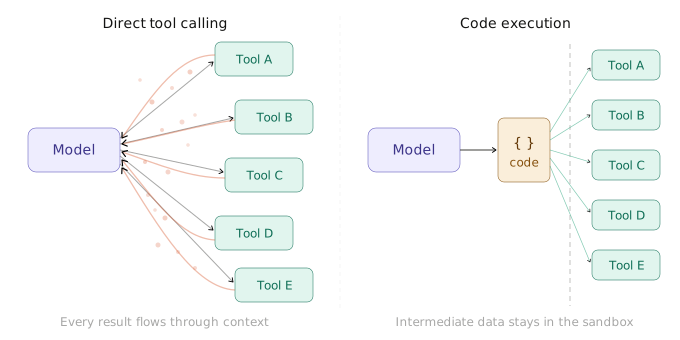
That changes the shape of the system. Tool definitions do not all have to sit in the model context. Intermediate results do not all have to be replayed through the model. Multi-step logic can run closer to the data it is manipulating.
This is the pattern execbox is built around: a reusable Node.js library layer for exposing host-defined tools and wrapped MCP servers to guest JavaScript, while keeping capability and runtime boundaries explicit.
Problem
Direct MCP tool loops are a good default. The client exposes tools, the model picks one, the host executes it, the result goes back into context, and the model decides what to do next.
That loop is simple, but an eager implementation scales poorly once the tool catalog or intermediate data gets large:
- every tool definition exposed up front consumes context,
- every intermediate result passes back through the model,
- large payloads are copied and summarized repeatedly,
- multi-step control flow becomes token-heavy.
flowchart LR
    M["Model"] --> T["Tool catalog in context"]
    T --> C1["Call tool A"]
    C1 --> R1["Return result to model"]
    R1 --> C2["Call tool B"]
    C2 --> R2["Return another result"]
    R2 --> M

    classDef model fill:#efe7ff,stroke:#6a3fd4,color:#20113a
    classDef catalog fill:#fff3d6,stroke:#d1a11f,color:#4f3200
    classDef tool fill:#d8f3ef,stroke:#1b8c7a,color:#0f3c36
    class M model
    class T catalog
    class C1,R1,C2,R2 tool
For tools that return large documents, search results, database rows, logs, or API payloads, the loop spends too much of the model budget on mechanical data movement. A compact programming surface lets the model call tool-like APIs, filter intermediate values locally, and return only the final result the host needs to see.
Signals
Posts from Anthropic and Cloudflare, along with the MCP client best practices, describe the same architecture pressure.
Anthropic’s post, Code execution with MCP: Building more efficient agents, frames direct MCP usage around two scaling problems: tool definitions consume context, and intermediate results consume more context. Their answer is to let the model write code against tool-like APIs, load definitions on demand, and keep intermediate processing inside the execution environment.
Cloudflare’s post, Code Mode: give agents an entire API in 1,000 tokens, makes the same argument from the API side: a large tool surface can become a smaller typed SDK surface that the model uses from generated code. Cloudflare then followed with Sandboxing AI agents, 100x faster, focused on where generated code should run.
The MCP docs call this pattern Programmatic Tool Calling / Code Mode: the model writes code, the code runs in a sandbox, and the host brokers MCP tool calls so only the final result needs to return to the model.
The two scaling pressures have related but distinct answers. Progressive discovery controls which tool definitions enter the model context, while programmatic tool calling controls how tools are invoked and where intermediate results are processed. They can be used independently or together.
Together, these posts and docs point in the same direction: eager direct tool calling is useful but expensive at scale, code execution can compress data movement, and the runtime cannot be an afterthought.
Execbox
execbox is the library layer I wanted for that pattern. It is not an agent framework or hosted sandbox product; it is a set of Node.js packages that turn host capabilities into callable guest namespaces, then run guest JavaScript against those namespaces through a chosen executor.
The package map is intentionally small: @execbox/core owns the execution contract, provider resolution, and MCP adapters; @execbox/quickjs provides inline and worker-hosted QuickJS execution.
The core flow stays the same across those packages: host code defines tools or discovers them from MCP, those tools become a deterministic guest namespace, guest code runs against that namespace, tool calls cross a host-controlled boundary, and results come back as JSON-compatible data. The same guest code shape can start with inline QuickJS and move to worker-hosted QuickJS without changing the provider contract.
sequenceDiagram
    autonumber
    participant App as Host application
    participant NS as Resolved namespace
    participant Guest as Guest runtime
    participant Boundary as Host boundary
    participant Systems as Systems / APIs / MCP servers

    App->>NS: Define or discover capabilities
    App->>Guest: Execute code with namespace
    Guest->>Boundary: Call tool
    Boundary->>Systems: Invoke capability
    Systems-->>Boundary: Structured result
    Boundary-->>Guest: Return JSON-safe value
    Guest-->>App: Return execution result
MCP can appear on either side of the flow. Upstream MCP servers can be wrapped into guest namespaces, and execbox can also expose code execution itself as an MCP server so a client gets a compact code-running surface instead of a large direct tool catalog.
Usage
In TypeScript, a typical MCP provider flow starts with an MCP server declared through the MCP SDK, then wraps it as an execbox provider.
import { McpServer } from "@modelcontextprotocol/sdk/server/mcp.js";
import { openMcpToolProvider } from "@execbox/core/mcp";
import { QuickJsExecutor } from "@execbox/quickjs";
import * as z from "zod";

const upstreamServer = new McpServer({
  name: "upstream",
  version: "1.0.0",
});

upstreamServer.registerTool(
  "search-docs",
  {
    description: "Search documentation.",
    inputSchema: { query: z.string() },
    outputSchema: { hits: z.array(z.string()) },
  },
  async (args) => ({
    content: [{ text: `found ${args.query}`, type: "text" }],
    structuredContent: { hits: [args.query] },
  }),
);

const handle = await openMcpToolProvider({ server: upstreamServer });

try {
  const executor = new QuickJsExecutor();
  const result = await executor.execute(
    '(await mcp.search_docs({ query: "quickjs" })).structuredContent.hits[0]',
    [handle.provider],
  );

  if (!result.ok) {
    throw new Error(result.error.message);
  }

  console.log(result.result);
} finally {
  await handle.close();
}
The runtime choice is separate from the provider shape. Use inline QuickJS for trusted, lowest-friction local execution. Use worker-hosted QuickJS when you want local execution off the main thread with worker lifecycle controls. Both use the same provider and execution contracts; the worker changes runtime placement and lifecycle, not the capability set.
Boundaries
The runtime does not own the capabilities. The provider and exposed tool surface define them.
If guest code can call a tool that deletes data, sends email, or reaches a private system, then guest code has that authority. Moving execution from inline QuickJS to a worker changes lifecycle and runtime placement, not what the exposed tools are allowed to do.
That capability boundary is not a runtime authorization decision. The host still needs to evaluate each sandbox-originated tool call against the applicable user confirmation or categorical grant. Approving a generated script should not automatically authorize every call it makes.
Execbox helps make that execution path controlled: fresh execution state per call, JSON-only tool and result boundaries, schema validation around host tool execution, bounded logs, timeout and memory controls, and abort propagation into in-flight host work.
Those controls matter, but they do not make a dangerous tool safe to expose. They make it easier to expose only the tools you intend, run generated code through a stable contract, and choose the runtime placement that matches the deployment.
That is the role of execbox: keep one capability model, support MCP tools and wrapped MCP servers, and let applications choose between inline and worker-hosted QuickJS without rewriting the guest/tool contract.
If you want to look at the implementation:

Mouaad Aallam
Software Engineer